Strings MobileHacking
Mobile Hacking Lab
This time we will take the strings challenge on Mobile Hacking lab.
We connect through adb via openvpn file and try to list the activites from the string application com.mobilehackinglab.challenge. Extract the path of the application
1
2
adb shell pm path com.mobilehackinglab.challenge
package:/data/app/~~p_54bM-A63QkAZxdaHHILQ==/com.mobilehackinglab.challenge-AfKKIwpsKTgv5lPYwRWv0Q==/base.apk
Extract the apk file
1
adb pull /data/app/~~p_54bM-A63QkAZxdaHHILQ==/com.mobilehackinglab.challenge-AfKKIwpsKTgv5lPYwRWv0Q==/base.apk
Then we can analyze the AndroidManifest.xml file
- Find one activity besides the MainActivity exported explicity and with a intent-filter.
- A receiver with the exported tag on true and an intent-filter defined inside.

Activity2
This activity has a intent-filter which are object to request an accion to other components in the application, it help with the comunication between components through three diferentes ways.
- Launch an Activity
- Initialize a Service
- Transmit an event.
Intent require an action which specifies the generic action to be executed ( ACTION_VIEW or ACTION_SEND ).
It also use Data, which make reference to the data that the action would require or the data type (MIME), like this case android:schema and android:host.
The category contains aditional information about the component type that control the intent, for example CATEGORY_BROWSABLE allows to be initialize for a web browser to show data like images or emails messages.
The source code of the Activity2
1
2
3
4
5
6
7
8
9
10
11
12
13
14
15
16
17
18
19
20
21
22
23
    public void onCreate(Bundle savedInstanceState) {
        super.onCreate(savedInstanceState);
        setContentView(R.layout.activity_2);
        SharedPreferences sharedPreferences = getSharedPreferences("DAD4", 0);
        String u_1 = sharedPreferences.getString("UUU0133", null);
        boolean isActionView = Intrinsics.areEqual(getIntent().getAction(), "android.intent.action.VIEW");
        boolean isU1Matching = Intrinsics.areEqual(u_1, cd());
        if (isActionView && isU1Matching) {
            Uri uri = getIntent().getData();
            if (uri != null && Intrinsics.areEqual(uri.getScheme(), "mhl") && Intrinsics.areEqual(uri.getHost(), "labs")) {
                String base64Value = uri.getLastPathSegment();
                byte[] decodedValue = Base64.decode(base64Value, 0);
                if (decodedValue != null) {
                    String ds = new String(decodedValue, Charsets.UTF_8);
                    byte[] bytes = "your_secret_key_1234567890123456".getBytes(Charsets.UTF_8);
                    Intrinsics.checkNotNullExpressionValue(bytes, "this as java.lang.String).getBytes(charset)");
                    String str = decrypt("AES/CBC/PKCS5Padding", "bqGrDKdQ8zo26HflRsGvVA==", new SecretKeySpec(bytes, "AES"));
                    if (str.equals(ds)) {
                        System.loadLibrary("flag");
                        String s = getflag();
                        Toast.makeText(getApplicationContext(), s, 1).show();
                        return;
                    }
- We need to launch the intent with the specific action
android.intent.action.VIEW - The string
u_1from the sharedPreferences has to be the same as the result of thecd()function. - The data schema and host have to be
mhlandlabssomhl://labs/<b64Value> - The b64data passed is compared with a cipher text.
Trigger intents
We can trigger intents via adb, this case with this command. But as we don’t know the ds correct value the screen close immediately.
1
adb shell am start -a android.intent.action.VIEW -d "mhl://labs/base64data" -n com.mobilehackinglab.challenge/.Activity2
We saw hardcoded in the code all the data ( secrets, IV,etc ) being able to reproduce the decrypt process.
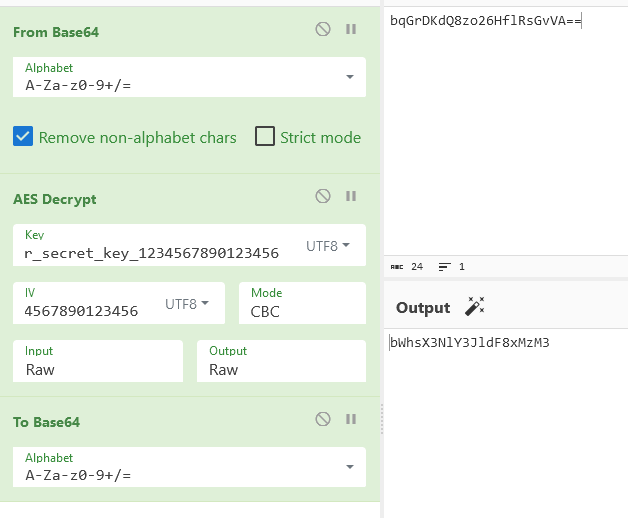
SharedPreferences
Who create the sharedPreferences DAD4?, looking at the MainActivity code we found the KLOW function
1
2
3
4
5
6
7
8
9
    public final void KLOW() {
        SharedPreferences sharedPreferences = getSharedPreferences("DAD4", 0);
        SharedPreferences.Editor editor = sharedPreferences.edit();
        Intrinsics.checkNotNullExpressionValue(editor, "edit(...)");
        SimpleDateFormat sdf = new SimpleDateFormat("dd/MM/yyyy", Locale.getDefault());
        String cu_d = sdf.format(new Date());
        editor.putString("UUU0133", cu_d);
        editor.apply();
    }
We can launch this function with Frida hooking the MainActivity
1
2
3
4
5
6
7
8
9
10
11
Java.perform(function (){
    setTimeout(function (){
        Java.choose('com.mobilehackinglab.challenge.MainActivity',{
            onMatch: function(instance){
                console.log("Creating SharedPreferences");
                instance.KLOW();
            },
            onComplete: function(){}
        });
    },1000);
})
We can combine this two options to pass all the If statements.
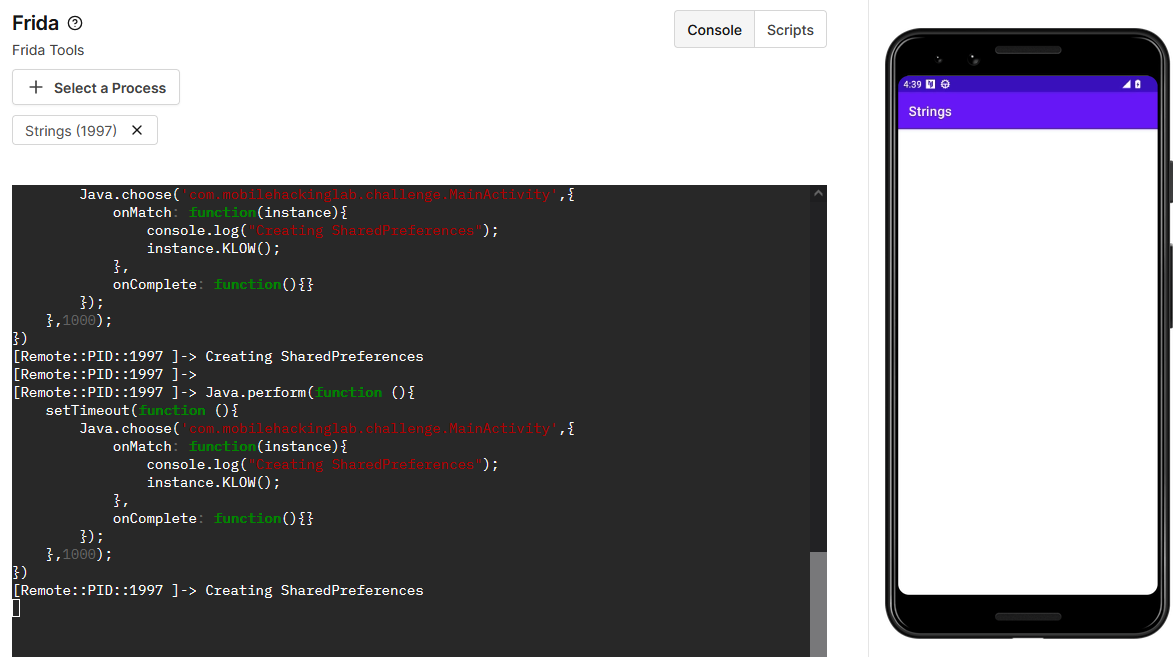
We saw a success message, but no flag :( ?
DUMP Memory
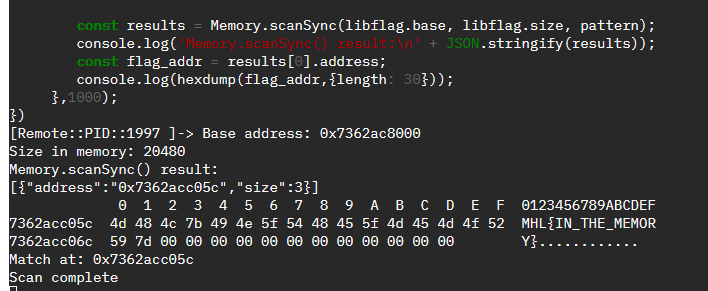
We can scan memory with frida as mention here
First we need to hook the library memory base address.

Define our pattern to search let pattern = 4d 48 4c for MHL.
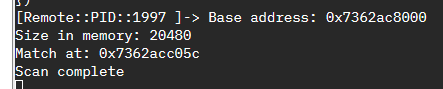
Now we need to read the value on that memory using Memory.scanSync
1
2
3
4
5
6
7
8
9
10
11
12
13
14
15
16
17
18
19
20
21
22
23
24
25
26
27
28
29
30
31
Java.perform(function (){
     setTimeout(function (){
        const libflag = Process.getModuleByName('libflag.so');

        // Pattern MHL
        let pattern = "4d 48 4c"

        console.log("Base address: " + libflag.base);
        console.log("Size in memory: " + libflag.size);

        // Memory.scan(address, size, pattern, callback)
        Memory.scan(libflag.base, libflag.size, pattern, {
            onMatch: function (address) {
                // Successful Match Message
                console.log("Match at: " + address);
            },
            onComplete: function () {
                // Scan complete Message
                console.log("Scan complete");
            },
            onError: function (error) {
                console.log("Scan error:" + error);
            },
        });

        const results = Memory.scanSync(libflag.base, libflag.size, pattern);
        console.log('Memory.scanSync() result:\n' + JSON.stringify(results));
        const flag_addr = results[0].address;
        console.log(hexdump(flag_addr,{length: 30}));
     },1000);
})