Common WordPress Vulnerabilites
Review
Now its time to review this article for Wordfence.
Missing capability checks
Most vulnerabilities will start with missing capability check and then escalate into an additional security issue like Stored Cross-site scripting or arbitrary file upload.
Capability checks verify that a user has the appropriate permission to perfrom an action. These functions can range from updating a plugins’s settings to uploading files.
Identifying Missing capability Checks
Look for action hooks in WordPress and verify that they have the approiate capability checks on their respective function.
1
add_action( 'admin_init', 'some_function_here' );
The following WordPress hooks are among the most common ones associated with insecure access control weaknesses.
- wp_ajax: Create AJAX actions for authenticated users, this requieres the user to be authenticated to a wordPress site. Every wp_ajax action needs to have its own capability checks.
- admin_init: This hook is used to run functions upon loading the WordPress administrative dashboard.
- wp_ajax_nopriv: Is an extension of the wp_ajax and used to create AJAX actions for user not authenticated.
- admin_post: It can be used to upadte settings and upload files. It does not perform any checks on its own to verify that the functions is being triggered by an administrator. It only detects being triggered from admin-post.php endpoint.
- admin_post_nopriv: extension of
admin_postfor users that are not authenticated. - admin_action: Used to fire actions in the admin dashboard, does not perform any checks to validate permissions, it does validate that the request is coming from an authenticated session.
- profile_update&personal_options_update: Used during WordPress user profile updates.
In addition to hooks with missing capability checks on their corresponding functions, all REST-API endpoints should be validated for appropriate protections.
Adding Capability Checks
Resolving flaws created by inadequate capability checks is simple by using the current_user_can() function. If the developer would like a site’s administrator to be the only user capable of performing an action, then they should make the capability check look for the manage_options capability.
When it comes to adding the appropriate capability checks to REST-API routes, use the permissions_callback function to validate that the user can access the specified REST-API endpoint.
Example CVE-2024-1229
SimpleShop <= 2.10.2 - Missing Authorization The SimpleShop plugin for WordPress is vulnerable to unauthorized disconnection from SimpleShop due to a missing capability check on the maybe_disconnect_simpleshop function in all versions up to, and including, 2.10.2. This makes it possible for unauthenticated attackers to disconnect the SimpleShop
We download the plugin version from here and install it.  Inside the Settings.php file, we see a function
 register_hooks()
1
2
3
4
5
6
7
8
	public function register_hooks() {
		add_action( 'admin_init', [ $this, 'init' ] );
		add_action( 'admin_menu', [ $this, 'add_options_page' ] );
		add_action( 'cmb2_admin_init', [ $this, 'add_options_page_metabox' ] );
		add_filter( 'cmb2_render_disconnect_button', [ $this, 'field_type_disconnect_button' ], 10, 5 );
		add_action( 'admin_init', [ $this, 'maybe_disconnect_simpleshop' ] );
		add_action( 'admin_print_styles', [ $this, 'maybe_display_messages' ] );
	}
admin_init will initialize while a user is accessing the admin-ajax.php and admin-post.php endpoints. So an unauthenticated users can trigger any functions hooked to an admin_init action. Lets check the code for the function
1
2
3
4
5
6
7
8
9
10
11
12
13
14
15
16
17
18
19
20
21
22
	public function maybe_disconnect_simpleshop() {
		if ( ! isset( $_GET['_wpnonce'] ) || ! wp_verify_nonce( $_GET['_wpnonce'] ) ) {
			return;
		}

		if ( ! isset( $_GET['disconnect_simpleshop'] ) || $_GET['disconnect_simpleshop'] !== '1' ) {
			return;
		}

		// Unset only API keys, leave the other settings saved
		$options = get_option( $this->key );
		unset( $options['ssc_api_email'] );
		unset( $options['ssc_api_key'] );

		// Set valid API keys to false
		update_option( 'ssc_valid_api_keys', 0 );

		// Update the SS options
		update_option( $this->key, $options );
		$url = add_query_arg( [ 'page' => 'ssc_options' ], admin_url( 'admin.php' ) );
		wp_redirect( $url );
	}
It requires and check the _wpnonce value, to protect against CSRF but doesn’t check if the action is triggered by an administrator. Lets update the plugin and see how they patch it.
1
2
3
4
5
6
7
8
9
10
11
12
	public function maybe_disconnect_simpleshop() {
		if ( ! isset( $_GET['disconnect_simpleshop'] ) || $_GET['disconnect_simpleshop'] !== '1' ) {
			return;
		}
		if ( ! isset( $_GET['_wpnonce'] ) || ! wp_verify_nonce( $_GET['_wpnonce'] ) ) {
			return;
		}
		if ( ! current_user_can( 'administrator' )) {
			return;
		}
        ...
    }
They add the current_user_can() to check if the user has the capability ‘administrator’.
Missing Cross-Site Request Forgery Protection.
CSRF protection requires the use of nonces “number used once”, In WordPress they are valid for a short period of time or until a user’s session has ended.
Opening a Door to Forged Requests
As with access control vulnerabilites, look for WordPress hooks and validate that each function has the appropiate nonce validation.
- admin_init
- wp_ajax
- wp_ajax_nopriv
- admin_post
- admin_post_nopriv
- admin_action
- admin_menu
If the hooked function uses check_ajax_referrer, check_admin_referrer or wp_verify_nonce then it does have a nonce check.
Example CVE-2024-4463
The Squelch Tabs and Accordions Shortcodes plugin for WordPress is vulnerable to Cross-Site Request Forgery in all versions up to, and including, 0.4.7. This is due to missing or incorrect nonce validation when saving plugin settings. This makes it possible for unauthenticated attackers to modify plugin settings via a forged request granted they can trick a site administrator into performing an action such as clicking on a link.
So we install the plugin inside our test environment.
Inside plguins/squelch../inc/admin.php on the 18 line, we saw the code to manage Save changes
1
2
3
4
5
6
7
8
9
10
11
12
13
14
15
16
17
18
19
20
21
22
23
24
25
if ( $_POST['submitted'] ?? '' == "1" ) {
    $valid = true;

    $new_theme      = $_POST['jquery_ui_theme'];
    $new_vanity_url = $_POST['vanity_url'];
    if ($new_vanity_url === false) $new_vanity_url = 'squelch-taas-';
    $new_vanity_url = trim( $new_vanity_url );
    if ( empty($new_vanity_url) ) $new_vanity_url = 'squelch-taas-';

    $new_disable_magic_url = $_POST['disable_magic_url'] ?? '' && true;

    if ($valid) {
        update_option( 'squelch_taas_jquery_ui_theme',   $new_theme             );
        update_option( 'squelch_taas_vanity_url',        $new_vanity_url        );
        update_option( 'squelch_taas_disable_magic_url', $new_disable_magic_url );

        $msg  = isset($GLOBALS['squelch_taas_admin_msg']) ? $GLOBALS['squelch_taas_admin_msg'] : '';
        $msg .= '<div class="updated"><p>'.__('Changes saved.', 'squelch-tabs-and-accordions-shortcodes').'</p></div>';
        $GLOBALS['squelch_taas_admin_msg'] = $msg;

        $theme = $new_theme;
        $vanity_url = $new_vanity_url;
        $disable_magic_url = $new_disable_magic_url;
    }
}
In the HTML code we don’t see any wp_nonce
1
2
3
4
            <p class="submit">
                <input type="hidden" name="submitted" value="1" />
                <input type="submit" name="submit" id="submit" class="button button-primary" value="<?php _e( 'Save Changes', 'squelch-tabs-and-accordions-shortcodes' ); ?>" />
            </p>
We confirm the submitted validation doesn’t have protection against CSRF vulnerabilites. lets check the patch on the latest version.
On line 99 inside form HTML tag they add.
1
  <?php wp_nonce_field( 'staas-admin-save', 'staas-admin', true ); ?>
and now in the new Save Changes functionality we see the proper validation for the nonces created.
1
2
3
4
5
6
7
8
9
10
if ( isset( $_POST['staas-admin'] ) ) {

    if ( wp_verify_nonce( $_POST['staas-admin'] ?? '', 'staas-admin-save' ) ) {
        $valid = true;

        $new_theme      = $_POST['jquery_ui_theme'];
        $new_vanity_url = $_POST['vanity_url'];
    ...
    }
}
Missing File Upload Validation
Uploading files to a WordPress site, whether through a setting import feature or a user profile picture upload, can pose significant security risks if the files are not thoroughly validated and sanitized before being stored on the server.
Finding Unrestricted File Uploads
$_FILES
This super global is used to obtain file data from request, one mistake is the use of $_FILES['type'] global variable to validate file’s type. This variable is based on the Content-Type header !.
The following PHP function can be used to upload files in PHP, if any of these functions are being used without any file type validation like wp_check_filetype or wp_check_filetype_and_ext.
- file_put_contents
- fopen
- fwrite
- move_uploaded_file
When auditing examine any use of exif_imagetype to determine a file type. This function will use the first few bytes of a file, also known as magic bytes.
snaitize_file_name function can sometimes lead to arbitrary file upload vulnerabilities if not properly implemented .
For example, if the filename sanitization function occurs after a filetype extension check that only checks extension against a blocklist of known bad extensions, then an attacker could supply a filename to bypass this check. For example, an attacker could name a file maliciousfile(.php) which would pass the file extension filtering since (.php) is not a known malicious file extension. Once the file extension check is completed and the filename is passed to sanitize_file_name, the parentheses will be stripped from the filename converting it to maliciousfile.php, allowing for a malicious file upload bypassing the original file extension checking.
Properly Validating File Uploads
WordPress makes it easy to handle file uploads securely with the wp_handle_upload() function. If it is prefered to use custom file upload features, it is recommended to use the wp_check_filetype_and_ext() or wp_check_filetype() functions at the very minimum to validate the uploaded file’s type and its extension to verify that it should be allowed to be uploaded to a WordPress site.
Example CVE-2024-4345
The Startklar Elementor Addons plugin for WordPress is vulnerable to arbitrary file uploads due to insufficient file type validation in the ‘process’ function in the ‘startklarDropZoneUploadProcess’ class in versions up to, and including, 1.7.13. This makes it possible for unauthenticated attackers to upload arbitrary files on the affected site’s server which may make remote code execution possible.
We download the version installed
Inside the wp-content\plugins\startklar..\startklarDropZoneUploadProcess.php we see the process method
1
2
3
4
5
6
7
8
9
10
11
12
13
14
15
16
17
18
19
20
21
22
23
24
25
26
27
28
29
30
31
32
33
34
35
36
37
38
39
40
41
42
43
44
45
46
47
48
49
50
51
52
    static function process()
    {
        $uploads_dir_info = wp_upload_dir();
        $user = wp_get_current_user();

        if (!isset($user) || !is_object($user) || !is_a($user, 'WP_User')) {
            $user_id = 0;
        } else {
            $user_id = $user->ID;
        }

        if (in_array('administrator', $user->roles)) {
            $admin_mode = 1;
        }

        if (!isset($_FILES["file"]) && !isset($_POST["mode"])) {
            die(__("There is no file to upload.", "startklar-elmentor-forms-extwidgets"));
        }
        foreach ($_POST as $key => $value) {
            if (strpos($key, 'hash') !== false) {
                $hash = sanitize_text_field($value);
                if (empty($hash)) {
                    die(__("No HASH code match.", "startklar-elmentor-forms-extwidgets"));
                }
                if (isset($_POST["mode"]) && $_POST["mode"] == "remove" && isset($_POST["fileName"])) {
                    $fileName = sanitize_text_field($_POST["fileName"]);
                    $newFilepath = $uploads_dir_info['basedir'] . "/elementor/forms/" . $user_id . "/temp/" . $hash . "/" . $fileName;

                    if (file_exists($newFilepath)) {
                        unlink($newFilepath);
                    }

                    die();
                }
                $filepath = $_FILES['file']['tmp_name'];
                $fileSize = filesize($filepath);
                if ($fileSize === 0) {
                    die(__("The file is empty.", "startklar-elmentor-forms-extwidgets"));
                }
                $newFilepath = $uploads_dir_info['basedir'] . "/elementor/forms/" . $user_id . "/temp/" . $hash . "/" . $_FILES['file']['name'];
                $target_dir = dirname($newFilepath);
                if (!file_exists($target_dir)) {
                    mkdir($target_dir, 0777, true);
                }
                if (!copy($filepath, $newFilepath)) { // Copy the file, returns false if failed
                    die(__("Can't move file.", "startklar-elmentor-forms-extwidgets"));
                }
                unlink($filepath); // Delete the temp file
            }
        }
        die();
    }
unfortunately i can’t install this extension because i didn’t notice it requieres Elementor PRO installed 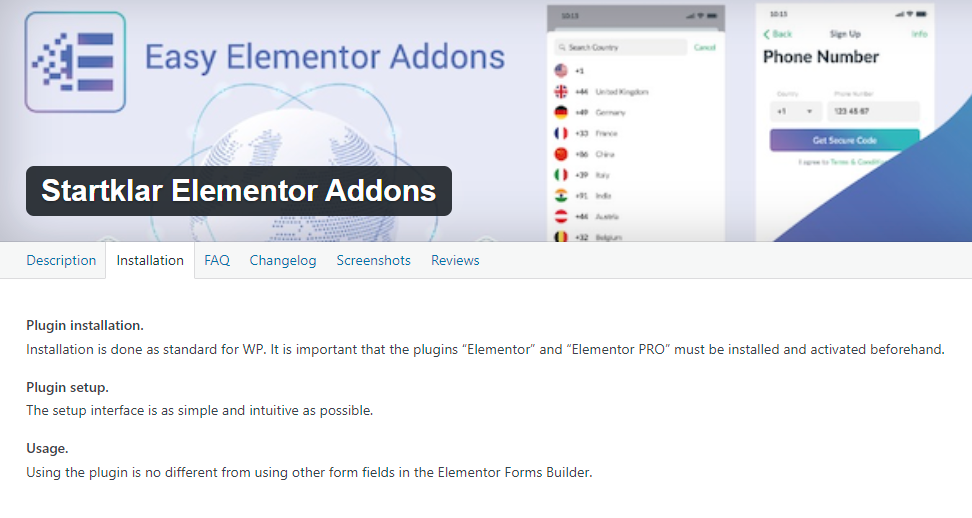 Analyzing the code we see inside the foreach, it make this evaluations
- The hash inside the _POST data.
- sanitize the filename and save the file
- check if its not empty
We can see nothing about file_type, leting the door open to someone use the server as a malware distribution point.
Lets check the newest version to catch up how did they patch it. Its very simple they add a line with the function wp_check_filetype
1
2
3
4
5
6
7
8
9
10
    ...
                $newFilepath = $uploads_dir_info['basedir'] . "/elementor/forms/" . $user_id . "/temp/" . $hash . "/" . sanitize_file_name($_FILES['file']['name']);
                $target_dir = dirname($newFilepath);

                $validate = wp_check_filetype( $_FILES['file']['name'] );

                if (!$validate['type']) {
                    die(__("File type is not allowed.", "startklar-elmentor-forms-extwidgets"));
                }
    ...
Deserialization of User-Supplied Input
If the unserialize() or maybe_unserialize() functions are used on user-supplied input, then an attacker can modify the execution of loaded classess via magic methods. In addition phar files have serialized meta-data stored in the manifest of the file that can lead to a deserialization weakness.
PHP Object Injection Vulnerabilites
On their own are not critical, but combined with full POP chain they can becamo disastrous. A POP chain is a way to chain magic methods, the most common are __wakeup and __destruct, which are automatically called during the deserialization of objects in PHP.
Discovering Deserialization Weaknesses
Analyze the presence of unserialize() or maybe_unserialize() functions in the code, if theres is a way that the user input unfiltered pass to any of these functions. Other function are file_exists, fopen, copy, filesize, mkdir and file_get_content that in conjunction with unfiltered input can indicate the presence of a phar deserialization weakness.
If a PHP Object Injection vulnerability is discovered, then the next step is to look for any magic methods that would escalate the severity of the vulnerability. The most common magic methods that should be looked for are __wakeup, __destruct, and __toString, though it is important to remember that there are several additional magic methods that can potentially be used for a POP chain.
Preventing Deserialization Vulnerabilites
Use JSON encoding rathe than PHP serialization for any user-supplied structured data, sanitize the user-supplied input to strip out known PHP wrappers.
Lack of Snaitization and Escaping on User-Supplied Inputs
When user-supplied inputs are not properly sanitizing and escaping, they can lead to XSS. Look for any instance where user-supplied data is being accepeted
- $_POST
- $_GET
- $_REQUEST
- $_SERVER
- $_COOKIE
- $_FILES
Aditionaly, using a function such as filter_input() without specifying an adequate filter may also indicate the presence of a vulnerabilty.
The unfiltered_html capability
When searching for Cross-Site Scripting (XSS) vulnerabilities in a WordPress site, it’s important to consider the unfiltered_html capability. This capability grants administrator and editor roles the ability to include unfiltered HTML, including scripting tags, in various areas of the site such as pages, posts, and widgets. However, not all cases of unsanitized input permitted by these privileged roles should be automatically classified as XSS vulnerabilities. There are legitimate scenarios where administrators and editors require the flexibility to incorporate scripting tags in specific sections of the site. Therefore, it’s crucial to assess each instance carefully, taking into account the context and intended functionality, before determining whether it constitutes a genuine Cross-Site Scripting vulnerability.
Sanitizing Inputs and Escaping Outpus to Prevent XSS
WordPress provide a lot of function to sanitize user-inputs, many of these are specific to ther intended use case.
- sanitize_text_field()
- sanitize_email()
- sanitize_file_name()
- sanitize_html_class()
- sanitize_key()
- sanitize_meta()
- sanitize_mime_type()
- sanitize_option()
- sanitize_title()
- sanitize_title_for_query()
- sanitize_title_with_dashes()
- sanitize_user()
- esc_url_raw()
When it comes to escaping outputs, there are several additional WordPress functions that can be used. Use these whenever user-supplied data is output on pages as they will strip out any bad characters esc_attr()
- esc_html()
- esc_js()
- esc_textarea()
- esc_url()
- esc_url_raw()
In addition to those escaping functions, WordPress also offers some additional escaping functions based on wp_kses() that can be used for page and post editing that will strip out unsafe HTML attributes and tags for users without the unfiltered_html capability.
- wp_kses()
- wp_kses_post()
- wp_kses_data()
- wp_filter_post_kses()
- wp_filter_nohtml_kses()
Example CVE-2024-4277
The LearnPress – WordPress LMS Plugin plugin for WordPress is vulnerable to Stored Cross-Site Scripting via the ‘layout_html’ parameter in all versions up to, and including, 4.2.6.5 due to insufficient input sanitization and output escaping. This makes it possible for authenticated attackers, with contributor-level access and above, to inject arbitrary web scripts in pages that will execute whenever a user accesses an injected page.
Download the plugin from here and lets installed on our test site. 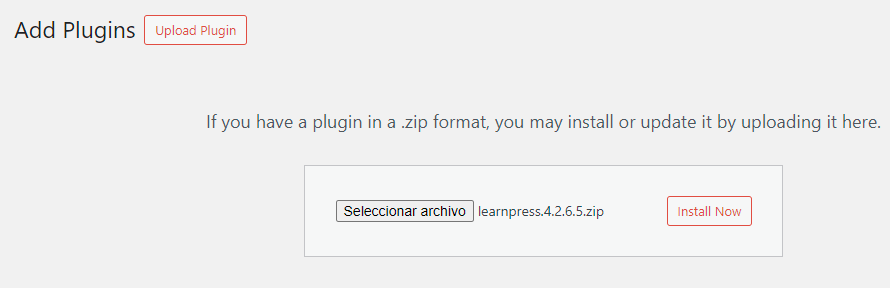 Inside the line 94 on the
 ListInstructorsElementor.php file
1
2
3
4
5
        ?>
        <li class="item-instructor">
            <?php echo $singleInstructorTemplate->render_data( $instructor, html_entity_decode( $item_layout['layout_html'] ) ); ?>
        </li>
        <?php
There is no escaping function applied. We check the latest version and find they patched using wp_kses() utilities.
1
2
3
4
5
6
7
8
				?>
				<li class="item-instructor">
					<?php echo $singleInstructorTemplate->render_data(
						$instructor,
						wp_kses_post( html_entity_decode( $item_layout['layout_html'] ) )
					); ?>
				</li>
				<?php
Unprepared SQL Queries
All of the data stored in the databse can be accessed using SQL, if usser-supplied input to a SQL query is not properly sanitized, escaped or prepared, then it can allow an attacker to either obtain addional data from the database beyond the originally anticipated data or even manipulate the data stored within the database.
It is important to ensure that WordPress plugins and themes have adequate protection to ensure a site doesn’t become vulnerable to SQL Injection attacks that can result in sensitive information disclosure
Where are SQL injection vulnerabilites found
The following WordPress functions that do not inherently perform any preparation or sanitization should be looked for.
$wpdb->get_results(): Retrieve a set of results via a SQL query and is not limited to just one row of results.$wpdb->query(): Similar to get_results, is not restricted to SELECT queries.$wpdb->get_row(): Will run a SQL query and return the results of a database row$wpdb->get_col(): The same but will return results of a database column.
If user-supplied input is used to run the query, validate it uses $wpdb->prepare(). If the function isn’t being prepared, then it is likely vulnerable to SQLi.
Example CVE-2024-34386
The Auto Affiliate Links plugin for WordPress is vulnerable to SQL Injection in all versions up to, and including, 6.4.3.1 due to insufficient escaping on the user supplied parameter and lack of sufficient preparation on the existing SQL query. This makes it possible for authenticated attackers, with editor-level access and above, to append additional SQL queries into already existing queries that can be used to extract sensitive information from the database.
Inside WP-auto-affiliate-links.php file on line 345 we see the vulnerable code that triggers when we select multiples links to be deleted.
1
2
3
4
5
6
7
8
	//Check if multiple items are selected for deletion
	if(isset($_POST['aal_massactionscheck'])) {

		$massids = filter_input(INPUT_POST, 'aal_massstring', FILTER_SANITIZE_SPECIAL_CHARS); // $_POST['aal_massstring'];
		$wpdb->query("DELETE FROM ". $table_name ." WHERE id IN (". $massids .")");

		wp_redirect("admin.php?page=aal_topmenu");
	}
as we can see the parameter aal_masstring is passed to variable massids which is used inside the SQL query. We create two links and then deleted together, capture the request in burpsutie and notice is vulnerable to SQLi, even the scan from BurpSuite can detect it 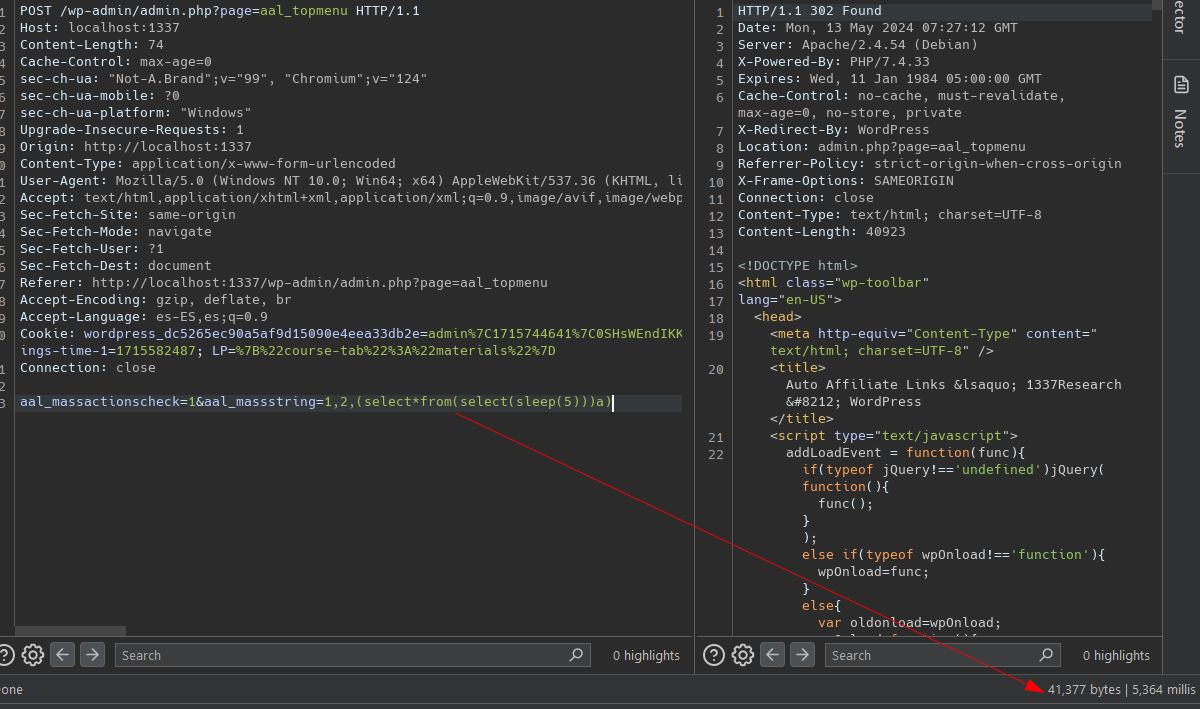 If we put a breakpoint in line 348 and check the value for
 $massids notice that FILTER_SANITIZE_SPECIAL_CHARS doesn’t do nothing to protect against sql injections. 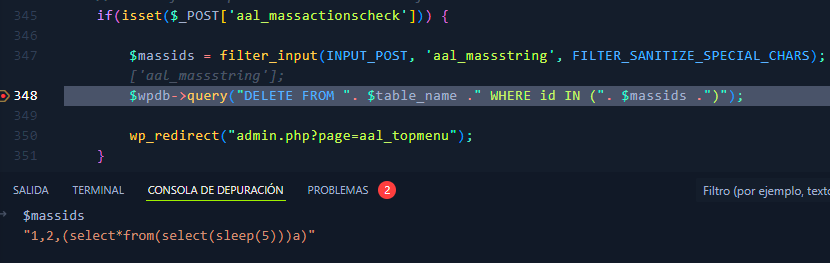
Lets update the plugin and see the patch
1
2
3
4
5
6
7
8
9
10
11
12
13
14
	//Check if multiple items are selected for deletion
	if(isset($_POST['aal_massactionscheck'])) {

		$massids = filter_input(INPUT_POST, 'aal_massstring', FILTER_SANITIZE_SPECIAL_CHARS); // $_POST['aal_massstring'];
		//$wpdb->query("DELETE FROM ". $table_name ." WHERE id IN (". $massids .")");
		if($massids) $massarr = explode(',',$massids);
		foreach($massarr as $did) {
			if($did && is_numeric($did)) {
				$did = (int)$did;
			$wpdb->query("DELETE FROM ". $table_name ." WHERE id = '". $did ."' ");
			}
		}
		wp_redirect("admin.php?page=aal_topmenu");
	}
Use explode to divide the massids using the ‘,’ as divisor. Then validate that are only numbers, if they are it will execute the query.
Usage of Certain PHP Function with User-Supplied input
This chapter talks about functions that allow remote command execution, pretty straight forward check this functions:
- exec()
- shell_exec()
- proc_open()
- system()
- passthru()
- eval()
Sensitive Information Disclosure
Sensitive information can range from personally identifiable information to nonces that lower-privileged individuals should not have access to.
They recommend looking for any functions that can add inforamtion to the source code of a page, especially in the /wp-admin area. This includes looking for the following hooks.
admin_footer: A hook that will add data or scripts to the footer of an administrative pageadmin_head: A hook that will add data or scripts to the header of an adminsitrative pagewp_footer: will add data or scripts to the footer of any page- ```wp_head``: The same but to the header of any page
wp_enqueue_script: A hook that will add scripts to any page and enqueue itadmin_enqueue_script: A hook that will add scripts to any administrative page and enqueue itlogin_enqueue_script: A hook that will add scripts to the login page and enqueue it
When looking through these hooks, verify that the associated function does not contain any sensitive information like full paths to a site, nonces not intended to be seen by low-privilege users, personally identifiable information of other users, data from logs, sensitive access keys, or any other information that may be deemed sensitive.
When plugins or themes export data they frequently contain some sort of information from the target site and this information has the potential to be sensitive.
Sensitive information disclosure vulnerabilities often stem from inadequate access control. These issues can usually be fixed by adding a capability check using the current_user_can() function to the code that handles sensitive data. This ensures only users with the proper permissions can access the information
File Access/Usage Weaknesses
File access and usage vulnerabilities in WordPress plugins and themes can have serious consequences. These weaknesses may allow attackers to read or delete files on the server, or even perform local or remote file inclusion attacks leading to unauthorized code execution.
When searching for file access/usage vulnerabilities, review code that includes, reads, or deletes files using PHP functions. Pay close attention to functions accepting user input, as they may introduce weaknesses if not properly validated. Functions to watch out for include:
Local and Remote File Includes
- include_once()
- include()
- require_once()
- require()
Arbitrary File Reading
- file_get_contents()
- fread()
- fopen()
Arbitrary File Deletion
- wp_delete_file()
- unlink()
To securely handle file operations, avoid using user-supplied inputs and instead rely on hardcoded file paths. Use wp_upload_dir() to get the WordPress uploads directory path and prefix it when working with files in /wp-content/uploads/. This prevents users from accessing arbitrary files.
Additionally, sanitize user input to remove characters that could enable directory traversal attacks. The sanitize_file_name() function is useful for stripping out special characters that could be exploited in file access or inclusion vulnerabilities.